A router with SQM fixed my lag spikes at gigabit. One setting decides whether it costs half your upload.
On my Google Fiber gigabit line, a GL.iNet Flint 3 with SQM turned on took my wired PC's upload lag from 1 in 20 packets waiting +102 to +133 ms down to +1 to +3 ms, in every run. Stock, with SQM off, it beat my old Nest (a B instead of a C) but still lagged. The catch: the Flint's default queue rule, cake, held my upload to 431 to 503 Mbps instead of about 950. Its other option, fq_codel, kept 613 to 736 with lag just as low. It fixed IPv6 too. It didn't fix a phone on my old Nest's Wi-Fi, behind it.
Test it yourself
- Run Waveform's free bufferbloat test on a wired PC with nothing else downloading. Note the grade and the upload's added delay (Upload Active).
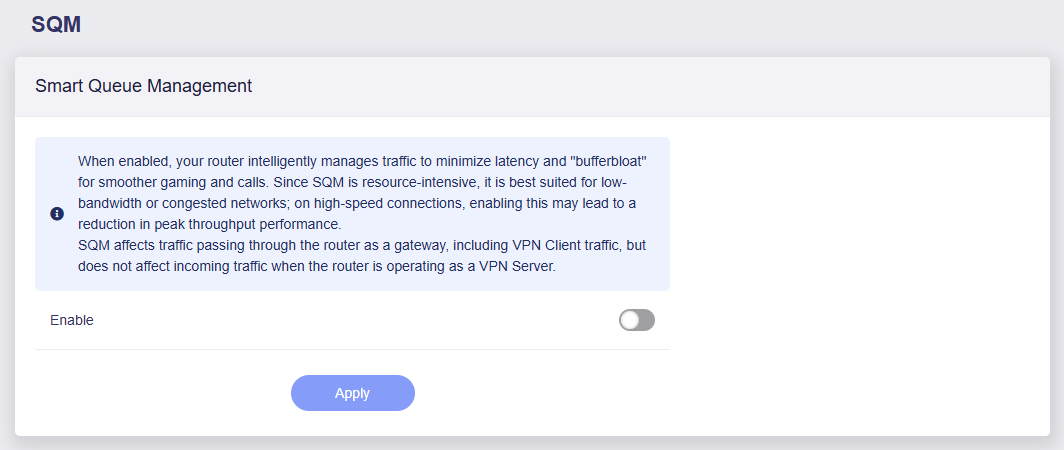
- Turn SQM on. On my GL.iNet Flint 3 (firmware 4.10.1) it's under FLOW CONTROL › SQM; it wasn't there on the 4.8.4 firmware the router shipped with. Set the Queue Rule to fq_codel and both limits to about 90% of your plan: 900 down and 900 up on a 1 Gig plan. GL turns Network Acceleration off while SQM is on.
- Do three runs off and three on, switching back and forth, and change nothing else in between.
- Compare the upload delay first, then the upload speed. If the speed lands far under your limit, try the other Queue Rule.
One router on one line. Your router's CPU and your plan decide what SQM costs, so measure yours.
The claims, one by one
The Nest, before: a C, and lag spikes the probe can see
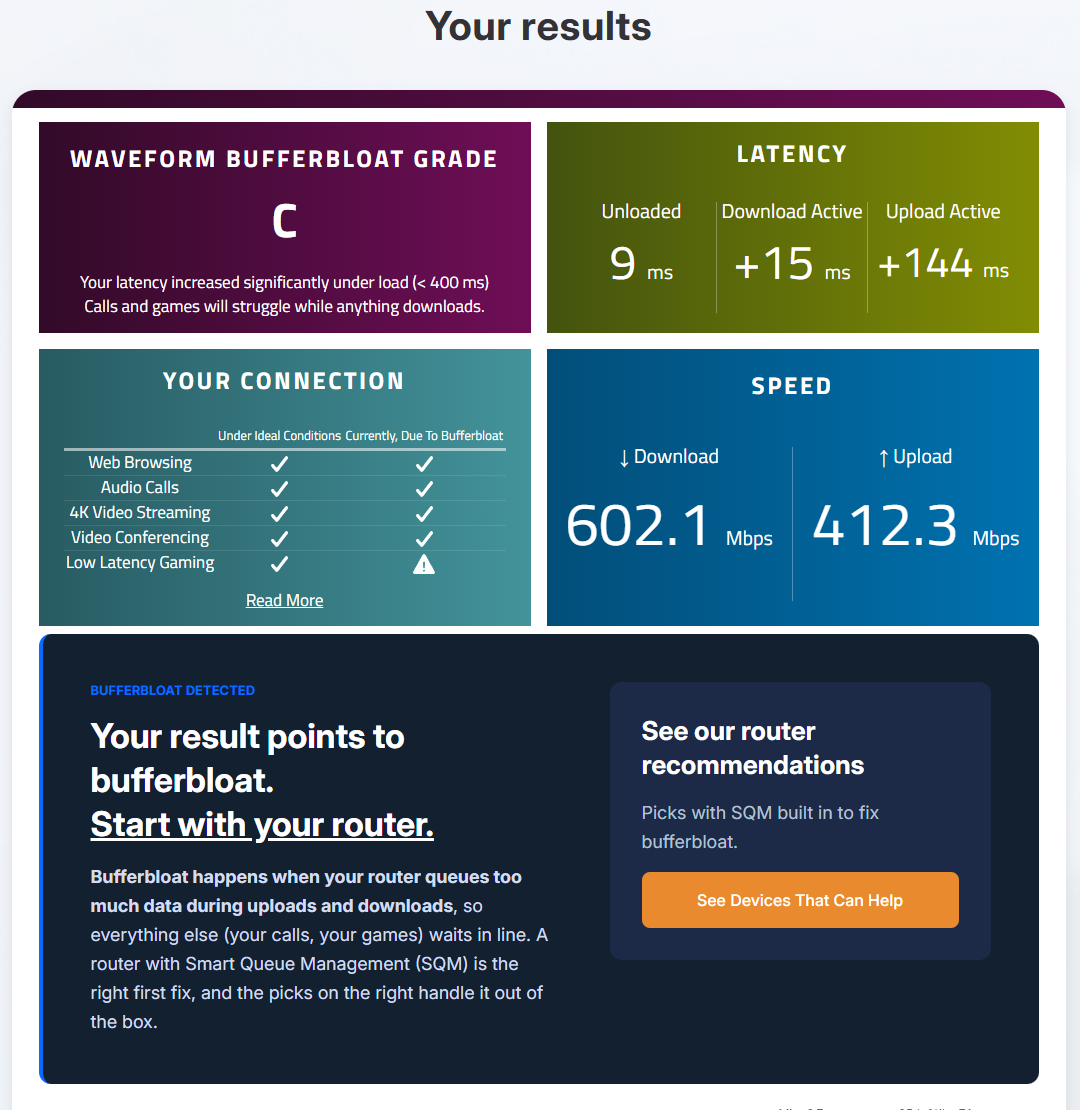
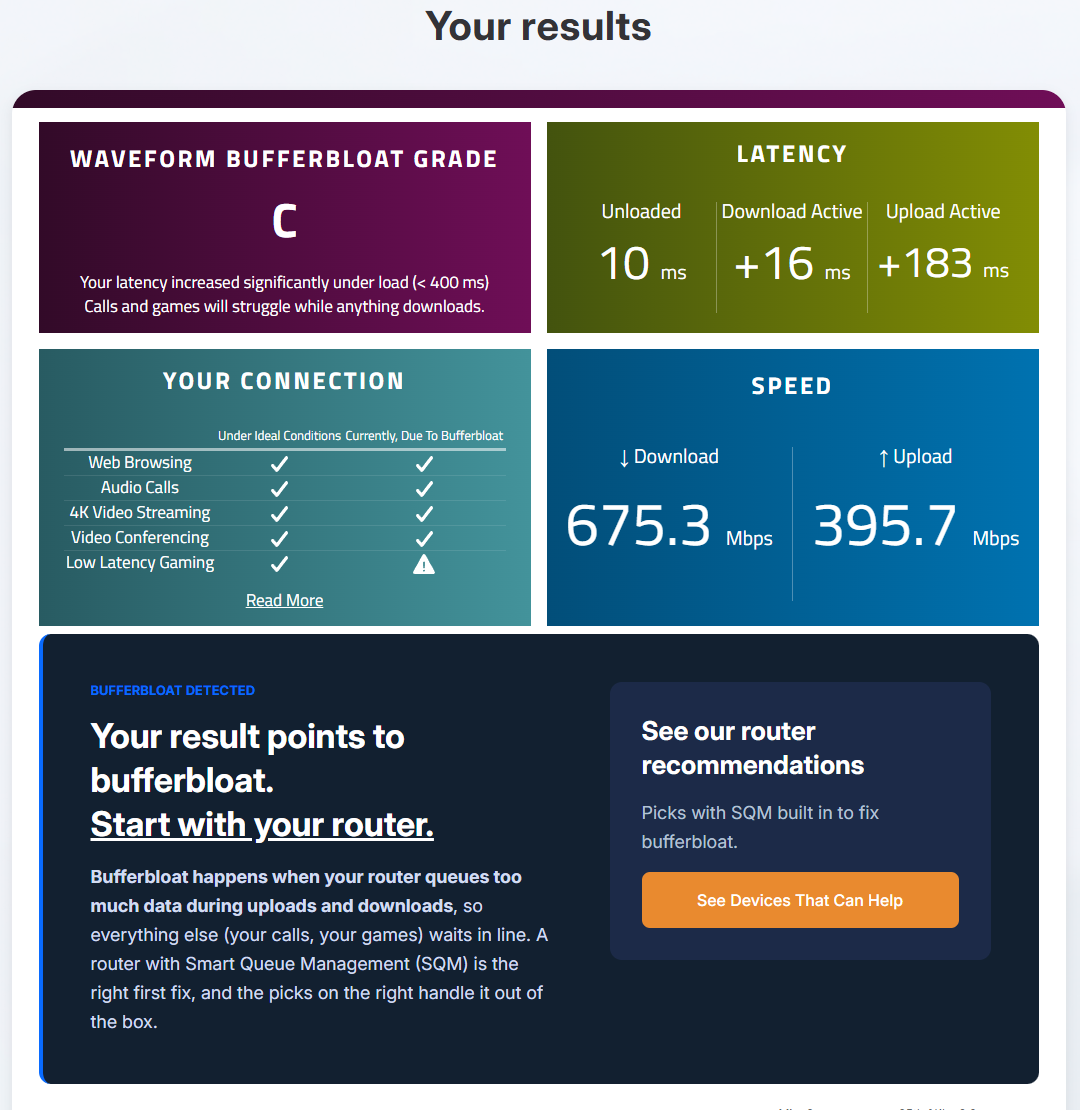
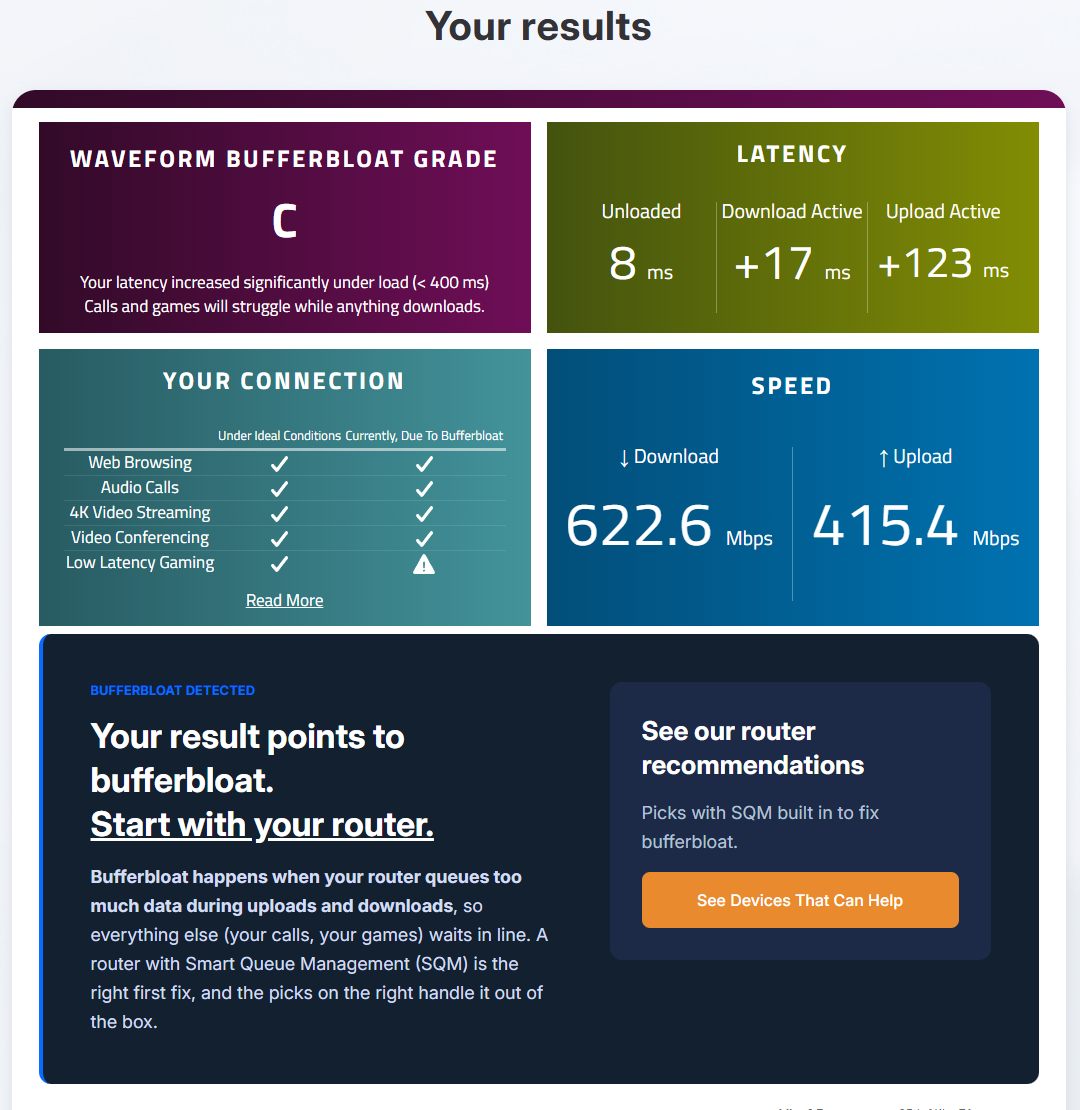
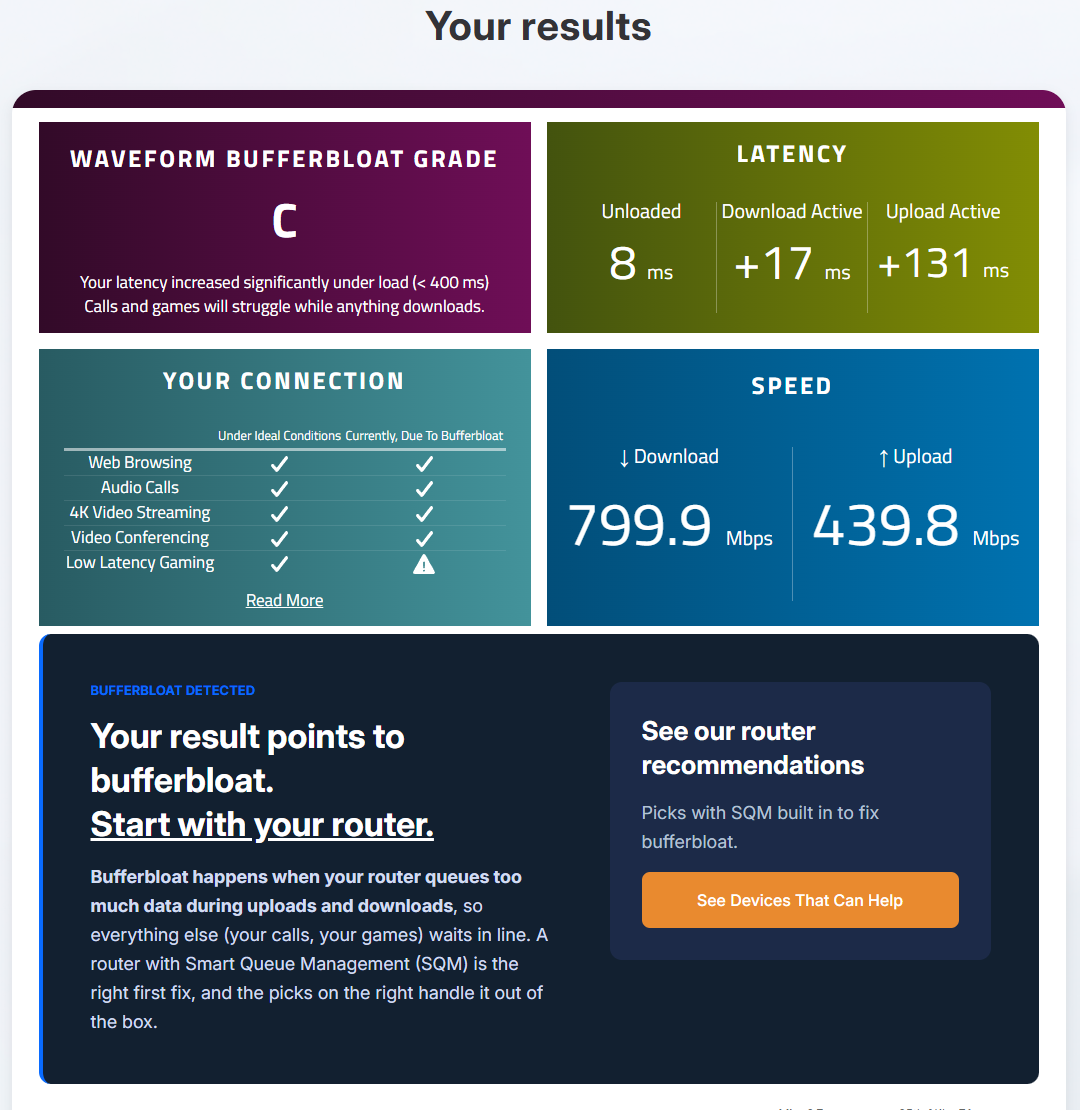
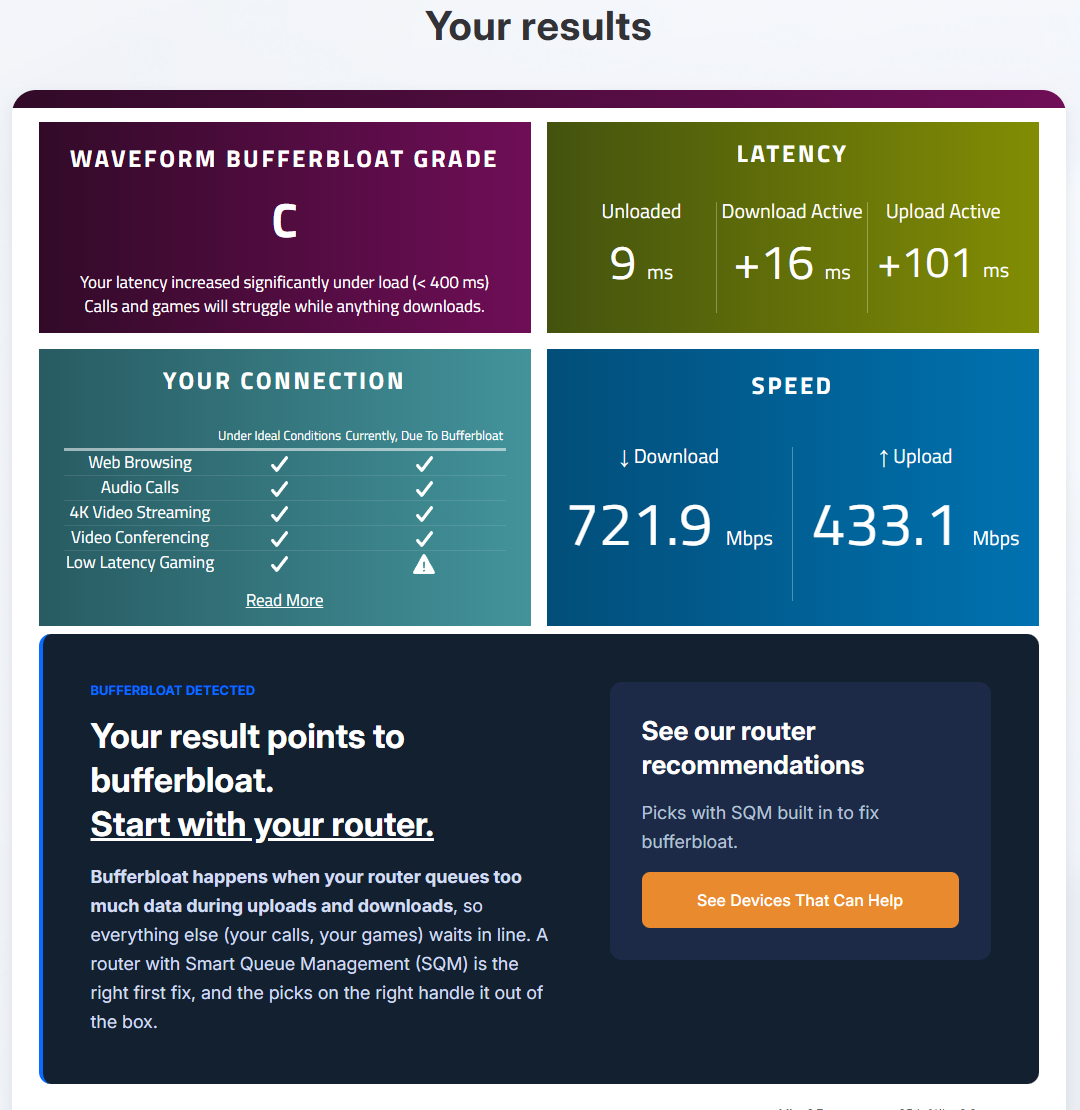
Three runs on the Nest, wired, with IPv6 off and auto-tuning normal: the setup video #1 ended on. All three graded C, with +123 to +183 ms added on upload. My probe's packets during the upload typically picked up +52 to +142 ms, 1 in 20 waited +248 ms or more, and the worst waited +418 ms. Two more runs on the morning of router day (Leg 0) graded C again, with 1 in 20 at +200 and +255 ms. This is what the Flint has to beat.
| Run | Setting | Median | p95 | Worst | n |
|---|---|---|---|---|---|
| the Nest, Oct 15 and the morning of Oct 20 | |||||
| Before-1 | Nest | +52 | +253 | +418 | 102 |
| Before-2 | Nest | +142 | +257 | +389 | 85 |
| Before-3 | Nest | +75 | +248 | +308 | 85 |
| N1 | Nest | +54 | +255 | +352 | 100 |
| N2 | Nest | +56 | +200 | +334 | 90 |
Added delay in ms during the upload phase. p95 = the 1-in-20 bad packet. n = packets timed in that phase.
A new router by itself isn't the fix
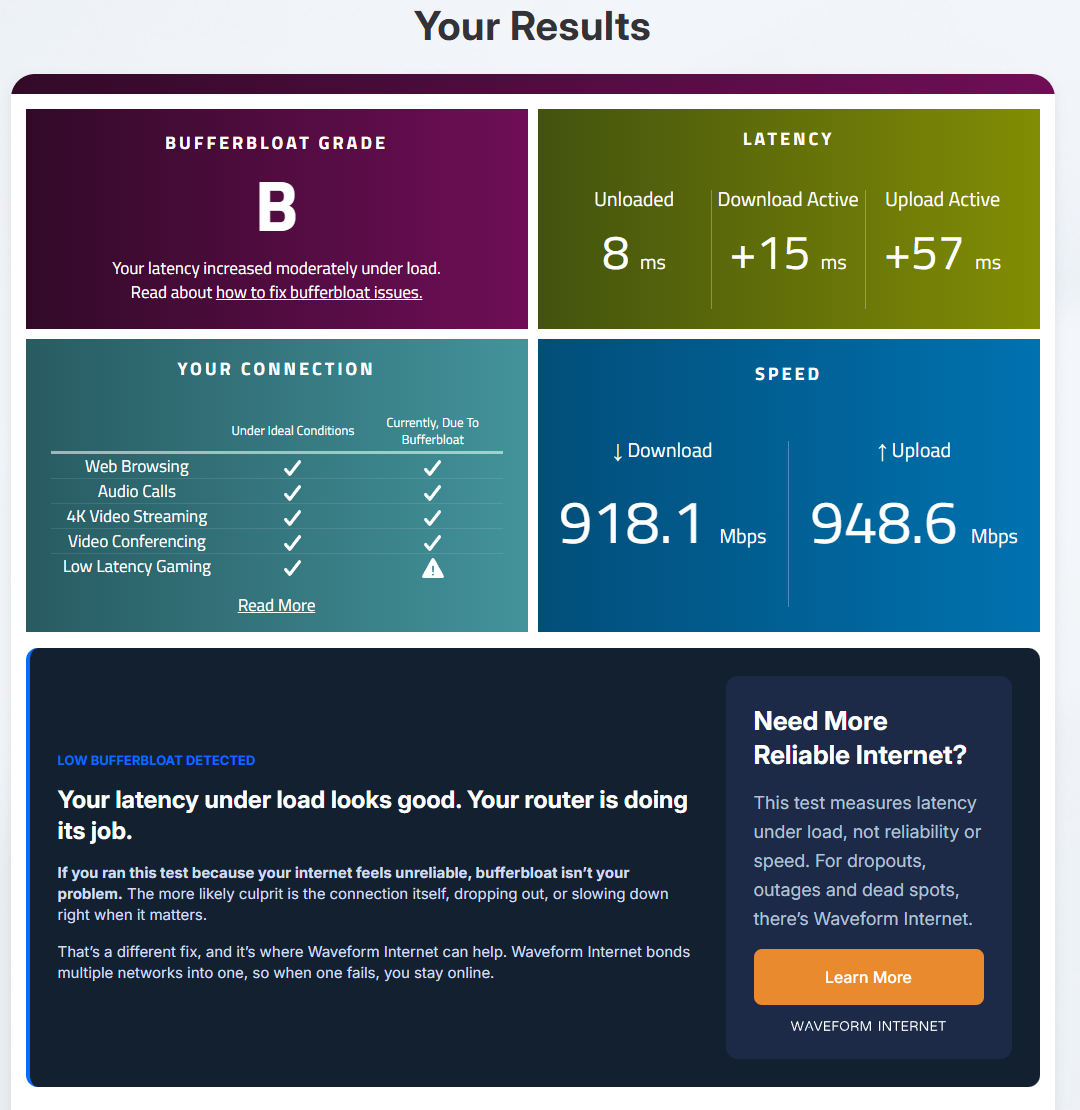
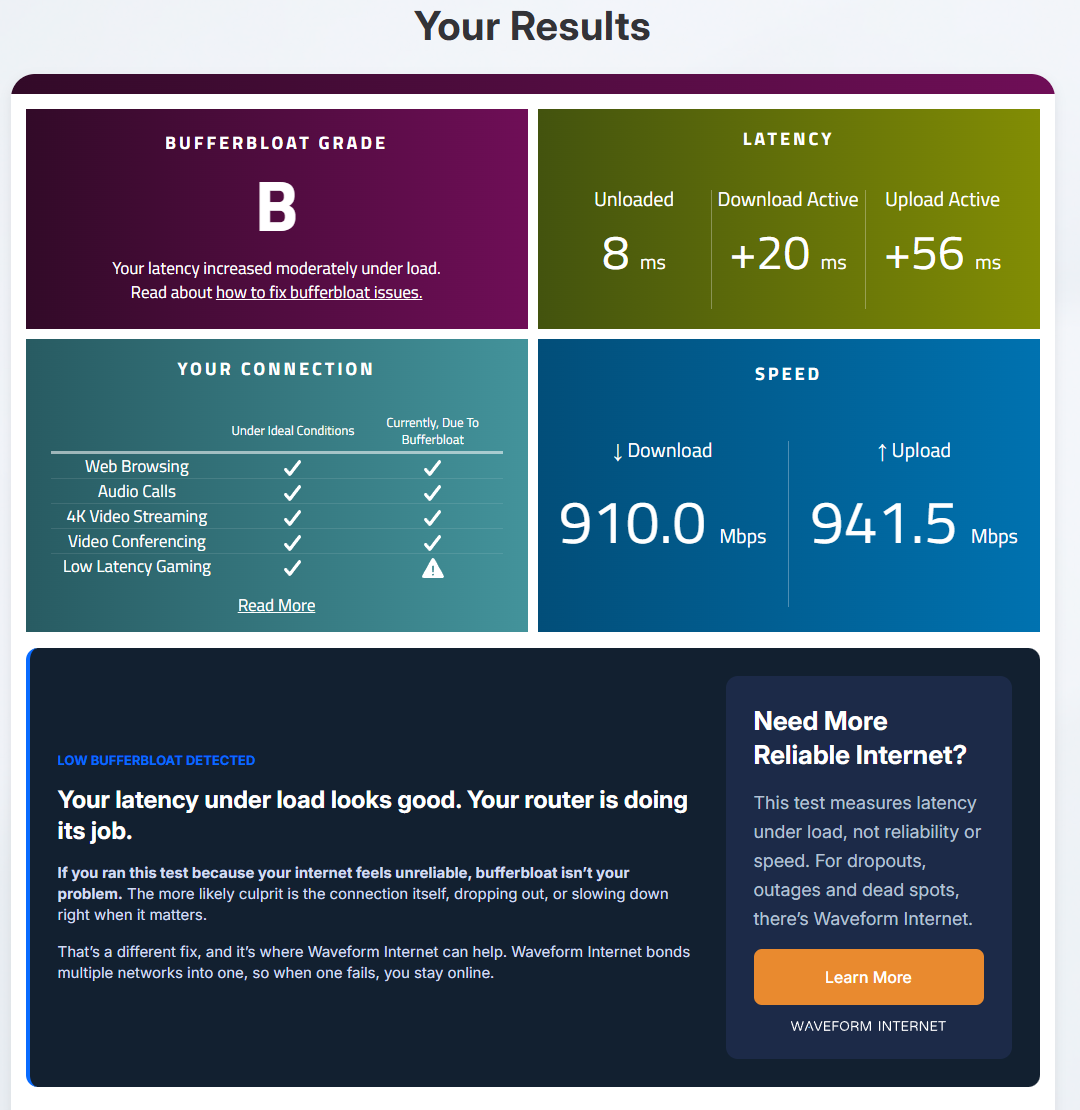
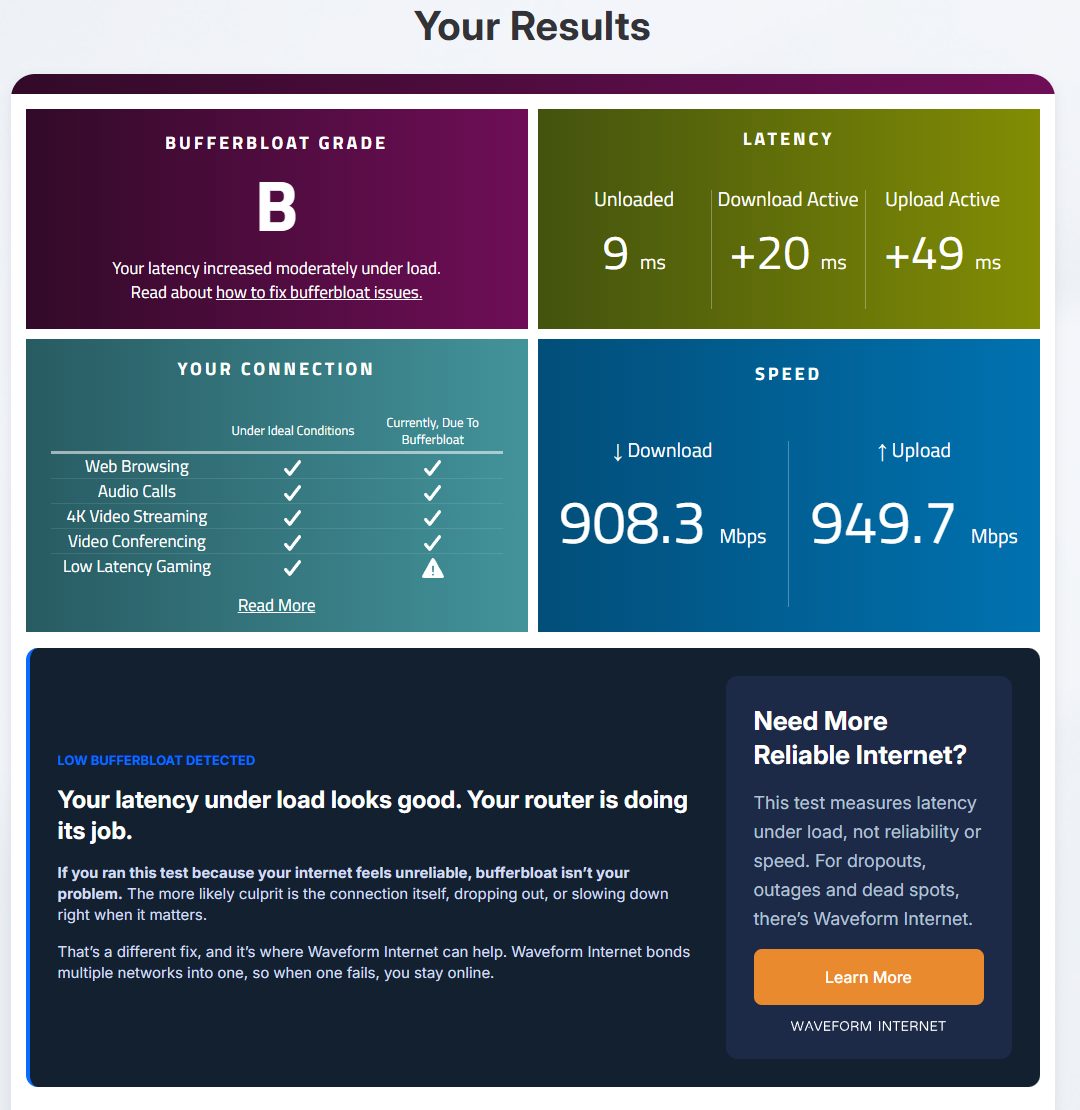
Stock, with SQM off, the Flint already beat my old Nest: a B instead of a C in all three Leg A runs, with 1 in 20 packets waiting +102 to +133 ms during the upload, against the Nest's +200 to +257. But it still lagged: every stock run had packets waiting an extra hundred milliseconds or more (6 to 11 of them per run). SQM is the fix, and it ships turned off.
First, proof the limit is in charge
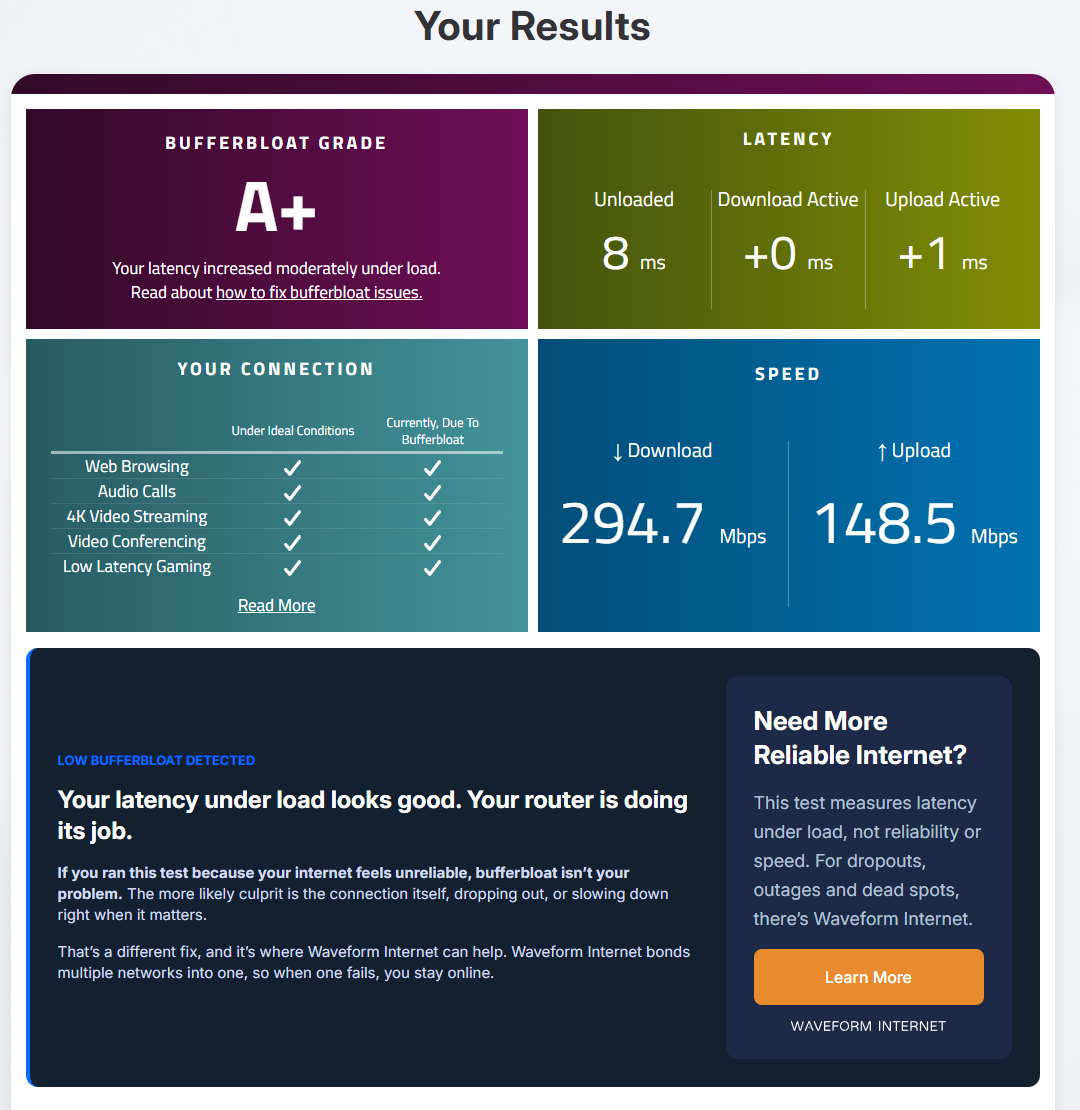
Before any counted run, I set SQM to cake at 300 down and 150 up and ran Waveform once. Both speeds landed just under their limits, each in the right direction: 294.7 down and 148.5 up, graded A+. If they hadn't, I'd have stopped and fixed the setup before Leg A.
SQM fixes the lag on my line: +102 to +133 ms down to +1 to +3 ms
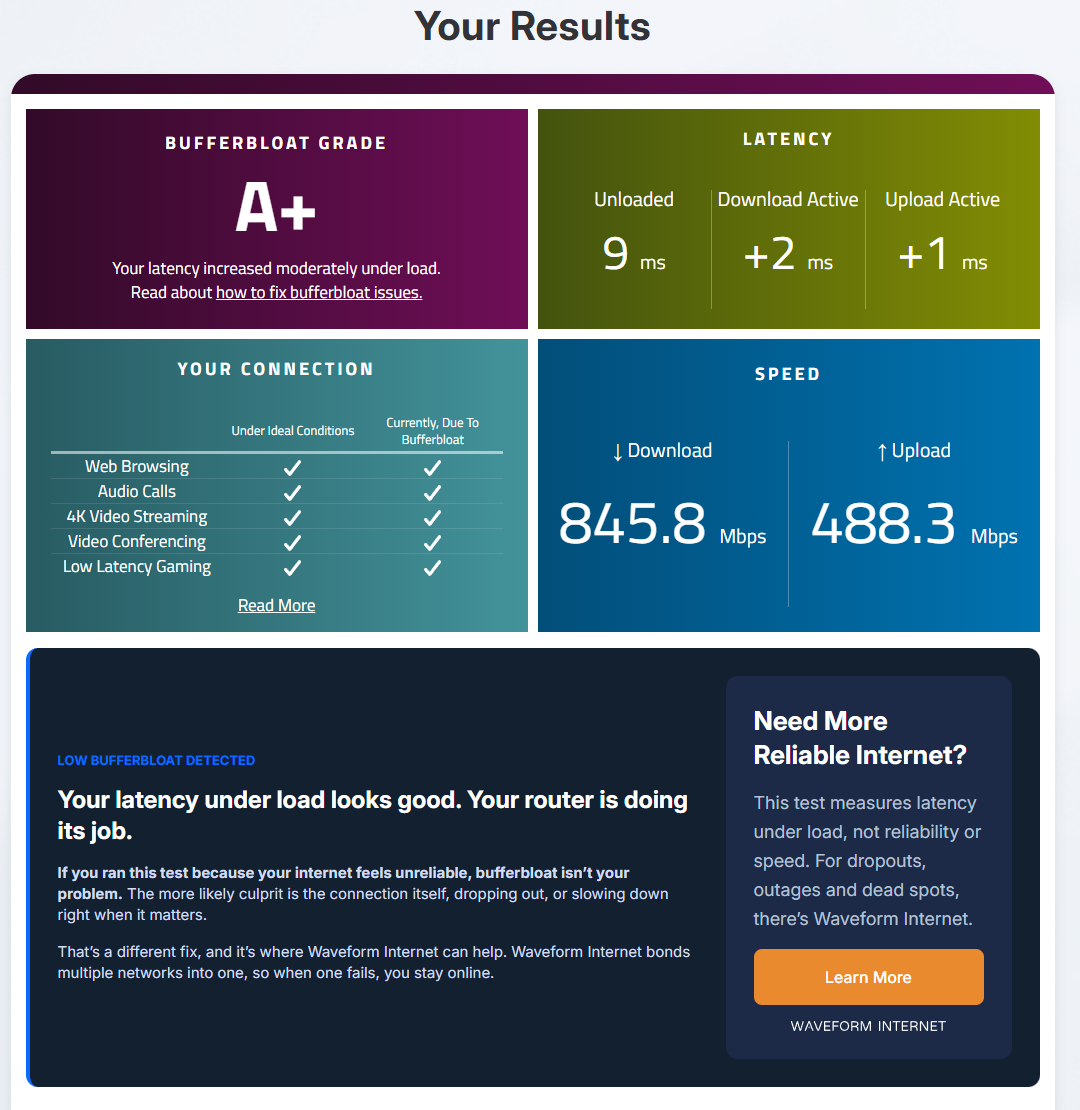
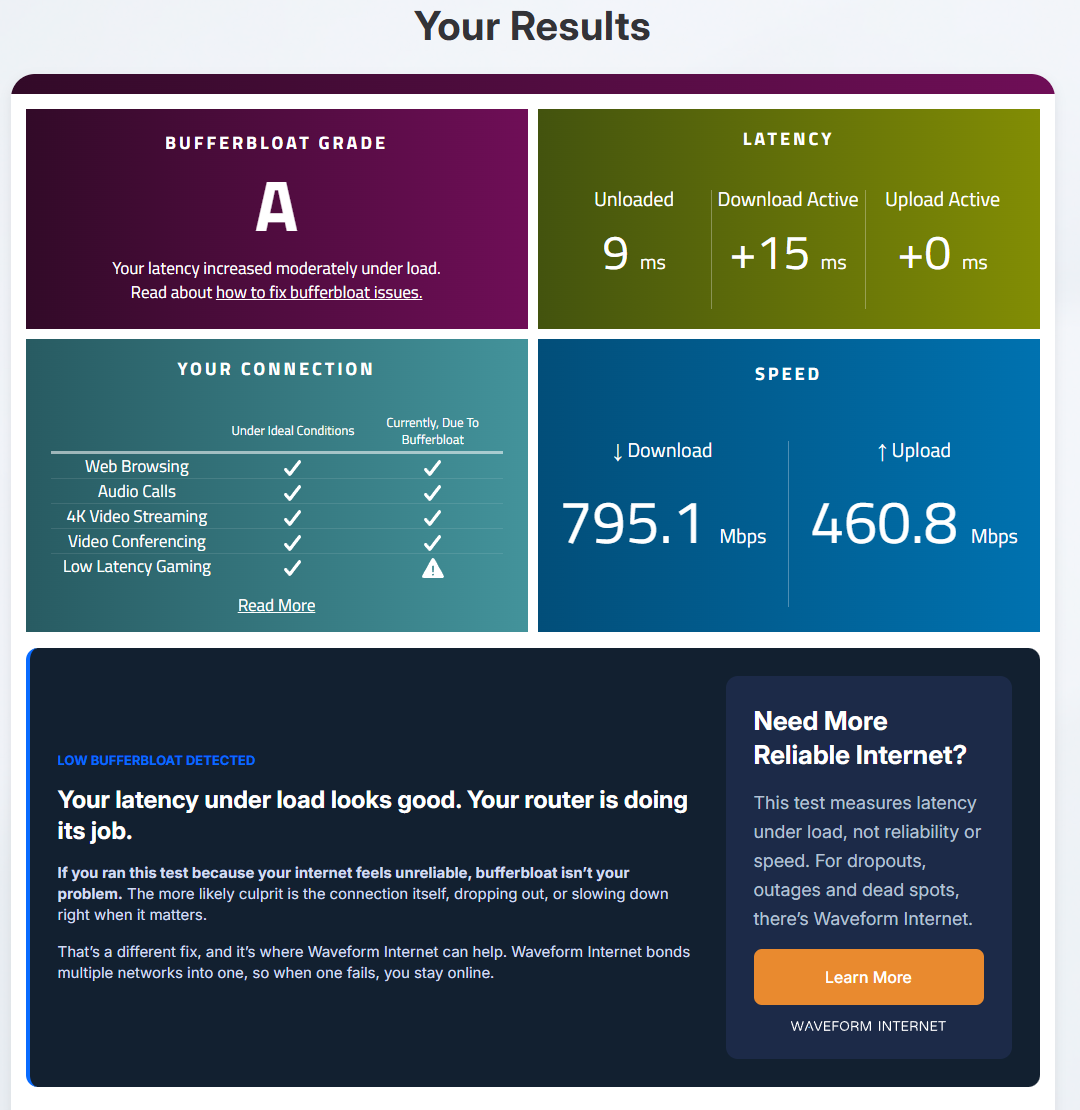
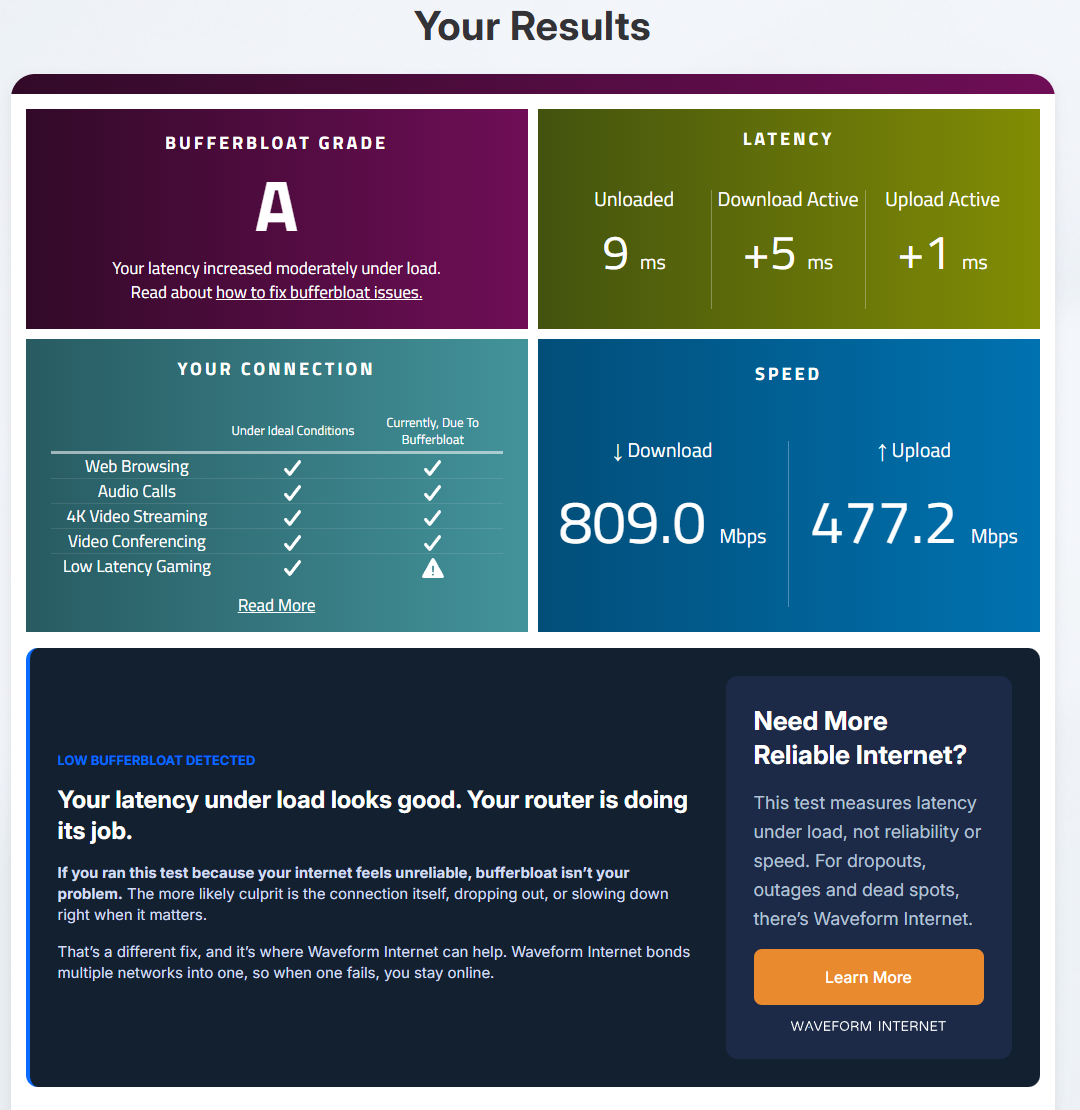
Leg A alternated stock and SQM on (cake, 900 down and 900 up), three runs each, on the wired PC. The rule, written on Oct 16 before the first run: every SQM-on run's 1 in 20 under +50 ms, and no SQM-on run overlapping any stock run. Stock graded B, B and B, with 1 in 20 packets waiting +102 to +133 ms during the upload. SQM on graded A, A and A+, with 1 in 20 at +1 to +3 ms and the worst packet at +3 to +10. It passed.
My normal ping didn't change: Waveform's idle reading was 8 to 9 ms on the Flint and 8 to 10 on the Nest. SQM only takes out the spikes under load.
| Run | Setting | Median | p95 | Worst | n |
|---|---|---|---|---|---|
| Leg A: stock vs SQM on (cake, 900 / 900), in the order they ran | |||||
| A1 | off | +31 | +114 | +161 | 110 |
| A2 | on | +1 | +3 | +10 | 128 |
| A3 | off | +27 | +133 | +160 | 114 |
| A4 | on | +0 | +1 | +10 | 128 |
| A5 | off | +25 | +102 | +168 | 109 |
| A6 | on | +1 | +2 | +3 | 139 |
Added delay in ms during the upload phase. p95 = the 1-in-20 bad packet. n = packets timed in that phase.
The catch: with cake, about half my upload was gone
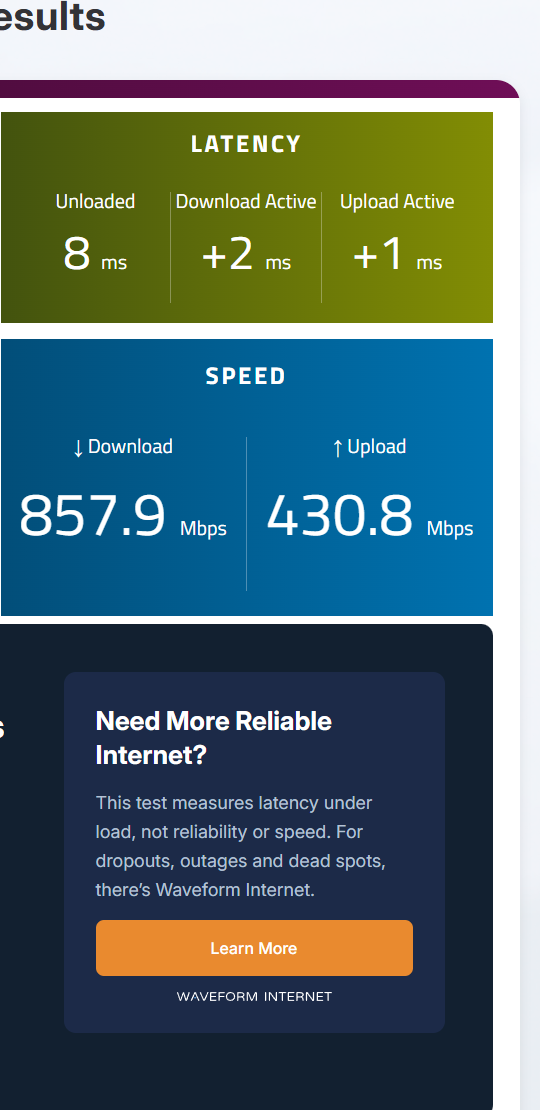
Cake is the Flint's default queue rule. With it on at 900/900, the upload stalled at 430.8 to 503.2 Mbps in all six runs at that limit, against 941.5 to 949.7 stock. Lowering the limit to 600 didn't move the wall (435.8 and 465.3), so the limit isn't what holds it back. GL's own SQM page warns about this. My best guess is the router's processor, since SQM switches off GL's hardware acceleration; I didn't measure its load.
At limits of 600 and up, cake also lagged on the download side in 3 of 8 runs, with 1 in 20 at +63 to +108 ms (the other five: +3 to +20). At a 300 limit both directions were clean, but the download fell to 263.3 to 293.9 Mbps, about two thirds less than stock's 908.3 to 918.1.
One setting got a big chunk back: fq_codel
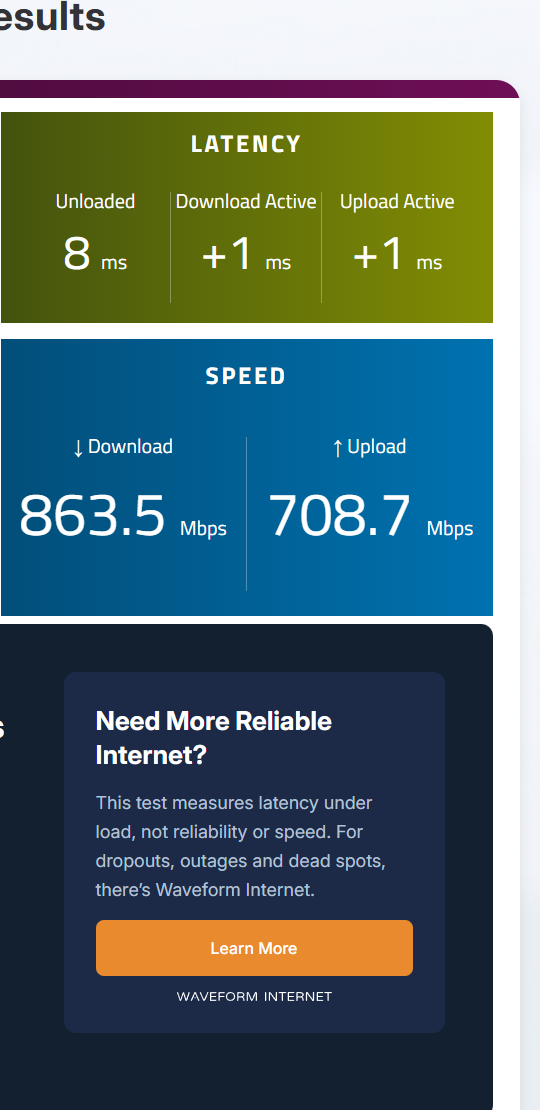
GL's Queue Rule menu has two options, cake and fq_codel. At the same 900/900 limit, fq_codel kept 612.8 to 735.9 Mbps of upload in all four runs, against cake's 430.8 to 503.2, and the lag stayed just as low: 1 in 20 at +2 to +4 ms (cake: +1 to +3). On the download side it never lagged: 1 in 20 at +1 to +8 ms in all four. Four runs is a strong lead, not proof. It's what I run now: fq_codel at 900 both ways.
No hit on one-connection downloads
Video #1's fix cost me single-connection downloads, so I checked whether SQM does the same. After each PC result, I timed one 100 MB download over a single connection from a Hetzner server in Ashburn, VA (Mbps = bytes × 8 ÷ total time). Stock, it ran 395 to 554 Mbps across 9 runs. With SQM on at a 900 limit, 499 to 718 across 15. No hit; if anything, a little faster. In Leg D, curl went over IPv4 on some runs and IPv6 on others.
curl.exe -s -o NUL -m 20 -w "%{size_download} %{time_total} %{time_connect}" https://ash-speed.hetzner.com/100MB.binIt fixes IPv6 too
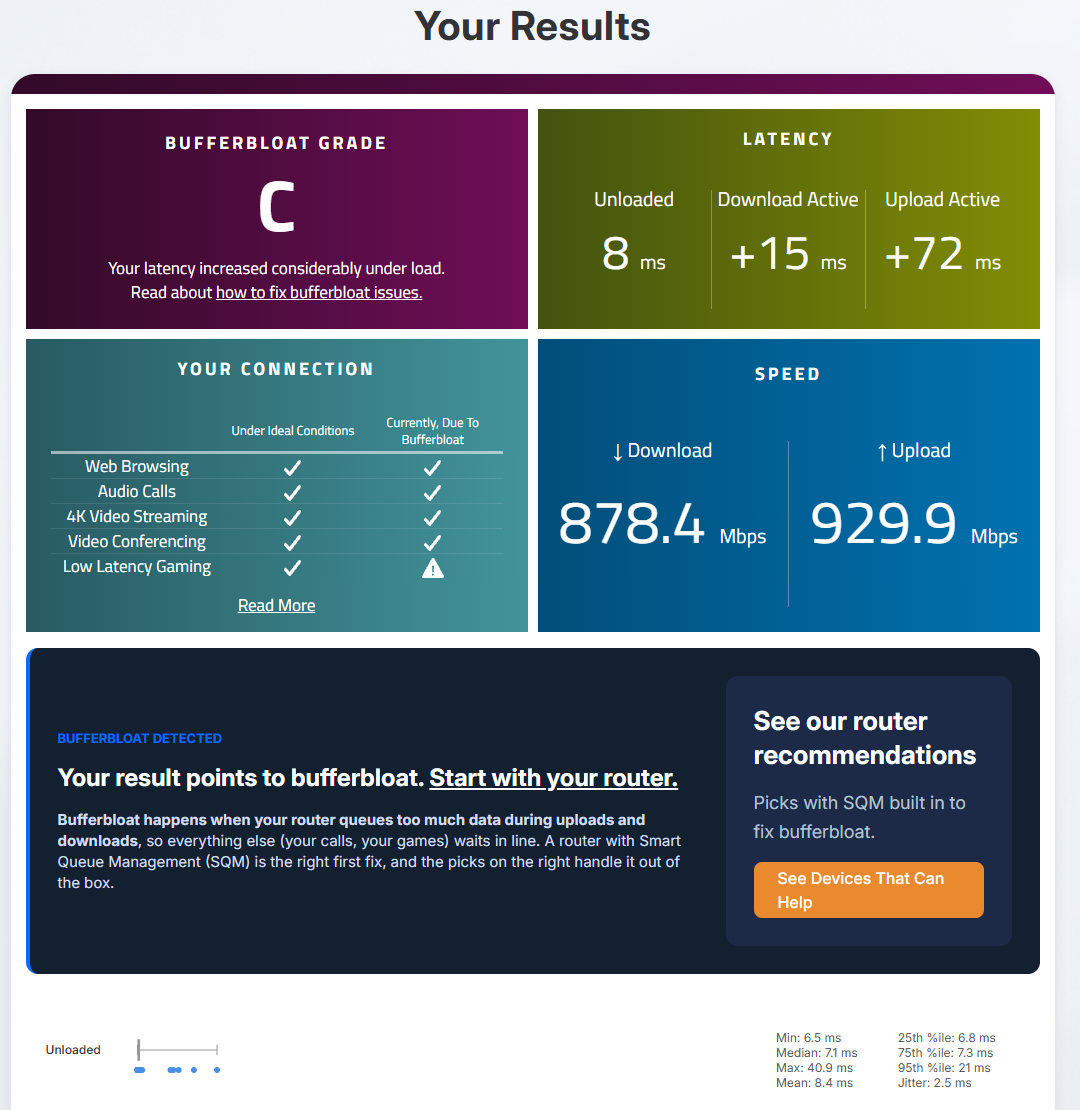
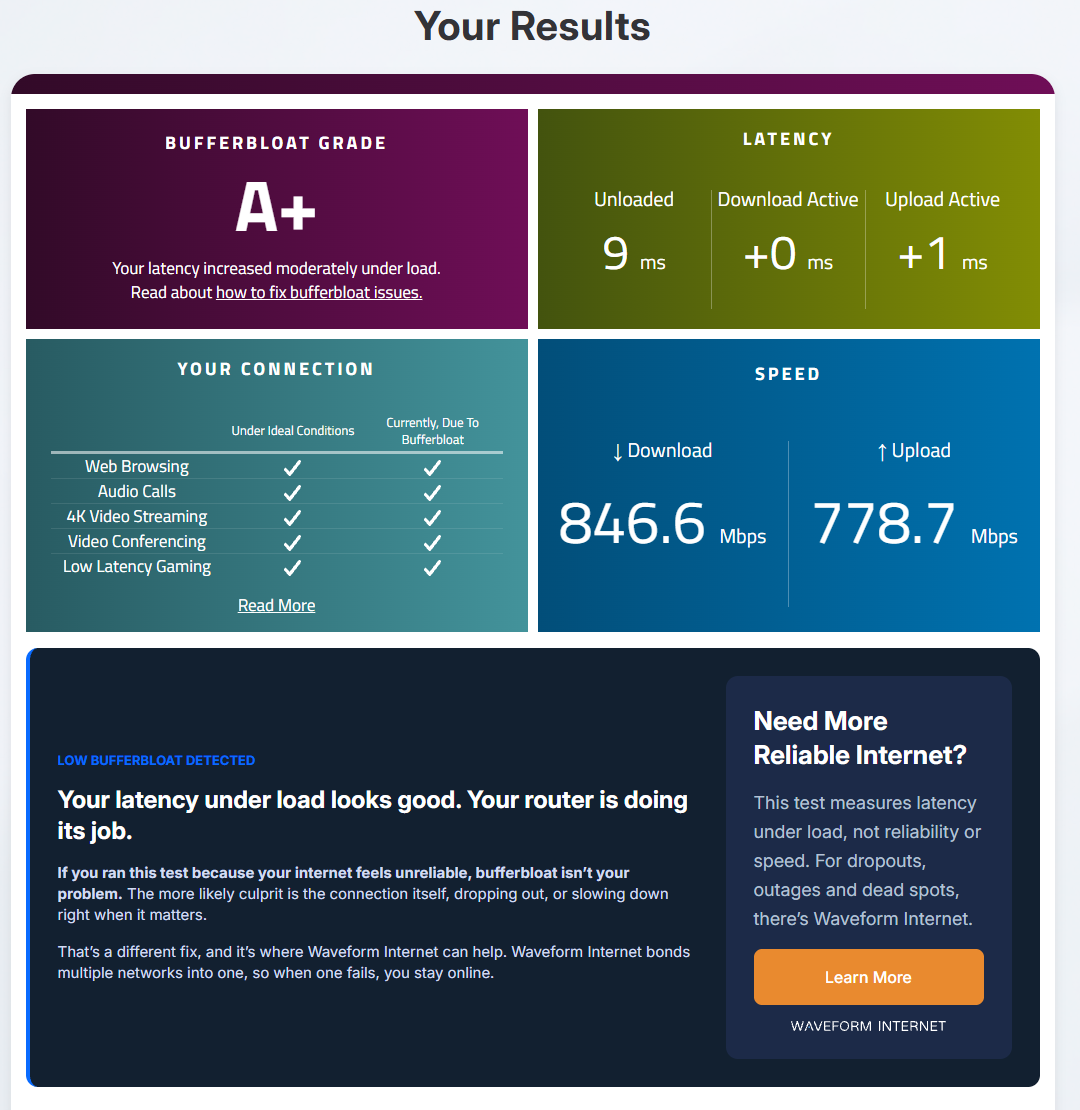
In my last video, IPv6 meant F grades on my old router. On the Flint I turned IPv6 on two ways: GL's default, NAT6, and native (ISP-assigned) IPv6, the way the Nest gave it. Counting only the runs where Chrome's connections were logged going over IPv6: stock graded A, B, B, C and B, never an F, with 1 in 20 packets at +30 to +148 ms during the upload. With fq_codel at 900/900 it got an A or A+ every time, at +3 to +5 ms, and +3 to +14 ms on the download side. D1 and D2 ran before that logger started, so they're listed but not counted.
Source: Video #1's receipts: IPv6 on the old router
| Run | Setting | Median | p95 | Worst | n |
|---|---|---|---|---|---|
| IPv6 on, NAT6 (GL's default): stock vs fq_codel 900 / 900 | |||||
| D1 | off | +25 | +104 | +150 | 103 |
| D2 | on | +2 | +4 | +7 | 146 |
| D3 | off | +18 | +30 | +35 | 120 |
| D4 | on | +1 | +3 | +7 | 140 |
| D5 | off | +28 | +98 | +118 | 113 |
| D5 redo | off | +26 | +86 | +117 | 111 |
| D6 | on | +1 | +4 | +17 | 124 |
| IPv6 on, native: stock vs fq_codel 900 / 900 | |||||
| D7 | off | +43 | +148 | +193 | 105 |
| D8 | on | +1 | +4 | +13 | 142 |
| D9 | off | +31 | +98 | +164 | 102 |
| D10 | on | +1 | +5 | +13 | 126 |
Added delay in ms during the upload phase. p95 = the 1-in-20 bad packet. n = packets timed in that phase.
It can't fix the Wi-Fi on a mesh behind it
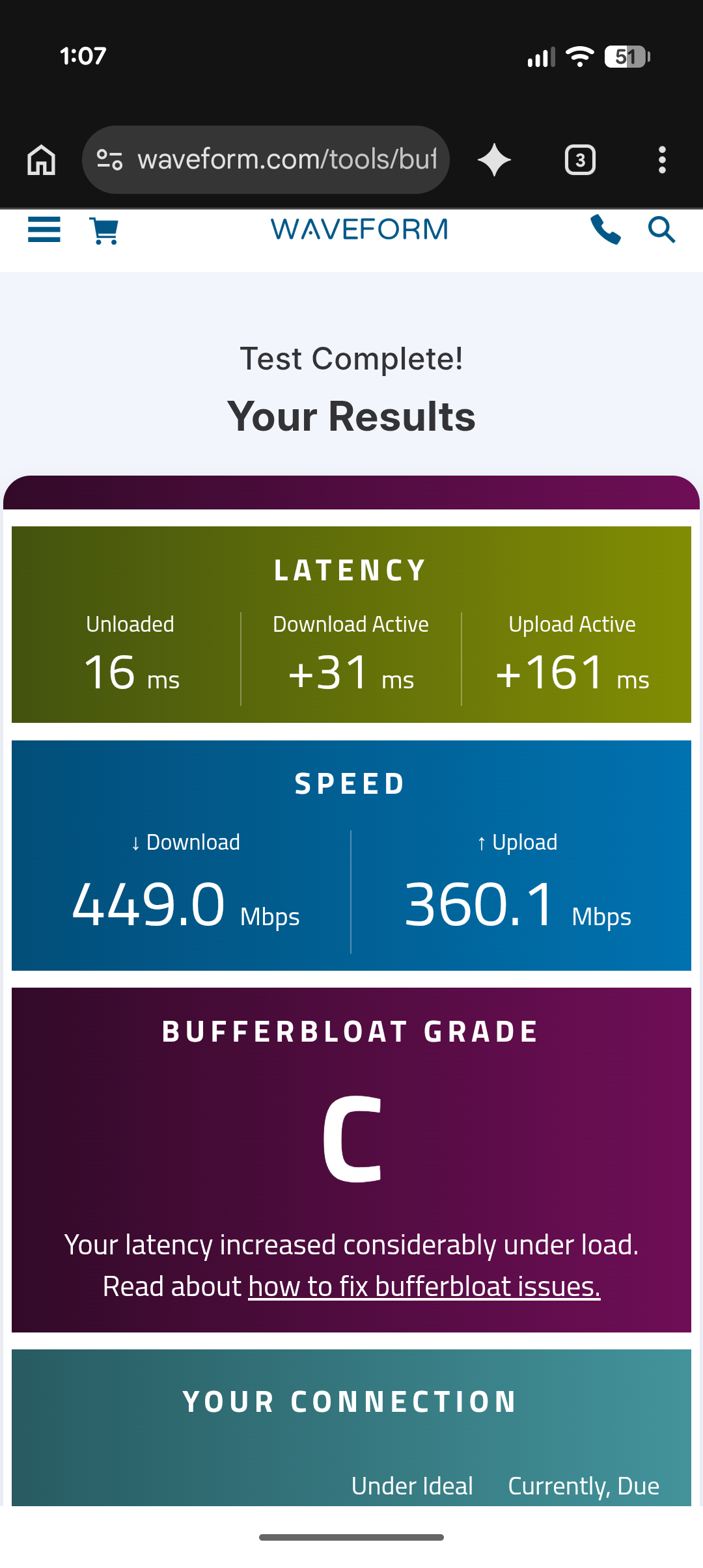
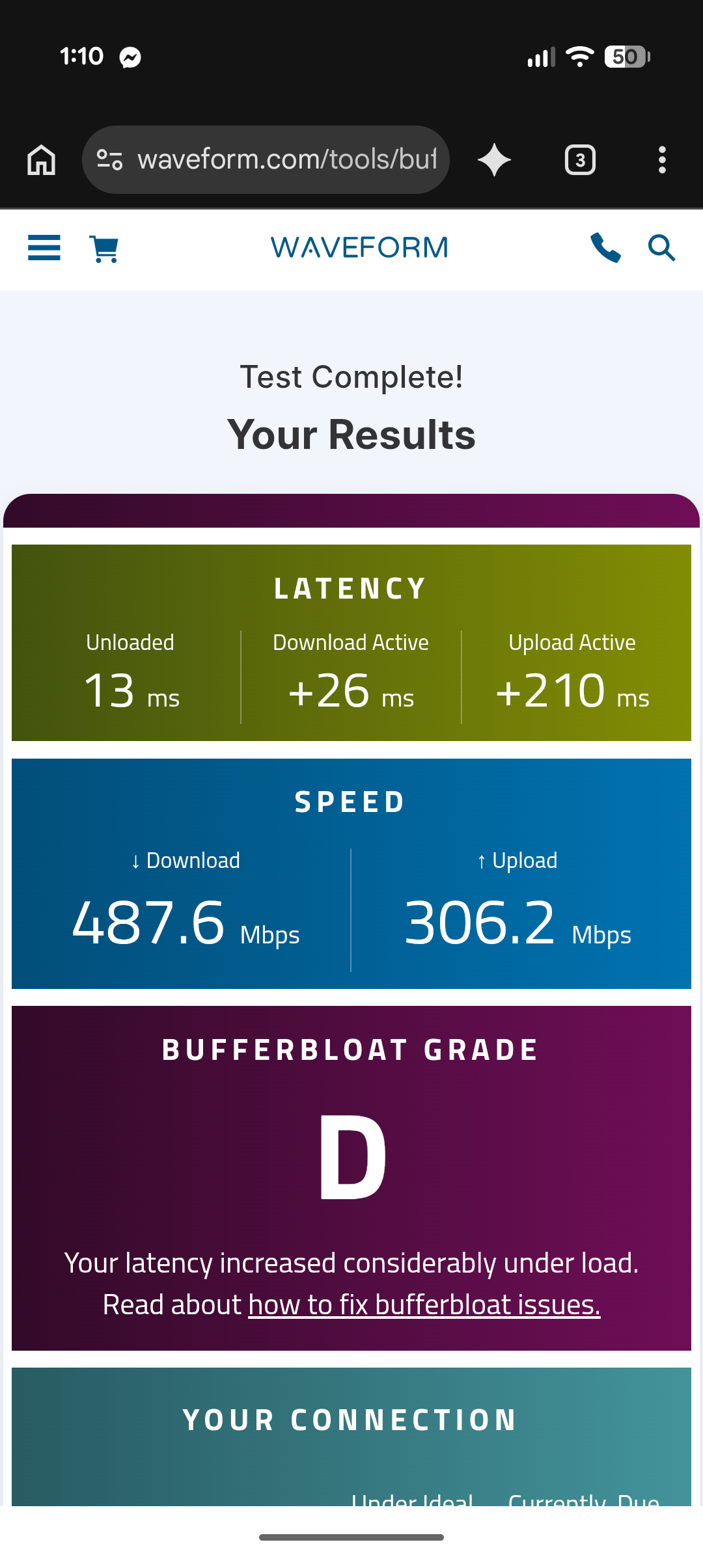
My old Nest stayed plugged in behind the Flint, with its own Wi-Fi on. My phone on the Nest's Wi-Fi graded C and C with SQM off, and D and C with fq_codel on: +161 to +210 ms added on upload either way. No better. On the Flint's own Wi-Fi, the same phone got an A every time, SQM off or on (Leg F, next). My best guess is that the lag builds inside the Nest, where the Flint's SQM can't reach; I didn't test that. If you add an SQM router, connect your gaming devices to it directly, wired or on its own Wi-Fi.
Someone else maxing out the internet: couldn't tell
Leg F asked a household question: does SQM protect my wired PC while someone else maxes out the internet? The PC sat idle with the probe running while my phone, on the Flint's own Wi-Fi, ran Waveform. But the phone alone couldn't make the Flint lag. With SQM off it pulled 1,105.1 to 1,122.4 Mbps down, and the idle PC's 1 in 20 stayed at +2 ms (worst +2 to +10). With nothing to fix, there's no verdict: that was the rule, set before the runs.
The phone graded A in all six valid runs. Those results are my read-outs, because the phone's incognito tab blocks screenshots. One side finding: with SQM on, the idle PC picked up small spikes (1 in 20 at +10 to +41 ms) that the stock runs didn't. I can't say why for sure.
Every run
Every graded test I ran, in order, including the invalid ones (marked, with the reason) and three off-plan runs. Delays are added on top of the idle ping, in ms; speeds are Waveform's, in Mbps. Each result links to Waveform's own result screenshot, and to the original Waveform page where I saved its link. Leg F's phone results are my read-outs: the phone's incognito tab blocks screenshots. Blank cells weren't logged.
Oct 15: the Nest, before the Flint
Three runs on the Google Nest Wifi Pro, the router video #1 was tested on. Same PC, same probe and the same settings as every run after it: wired, IPv6 off, auto-tuning normal.
| Run | Time | What changed | IPv6 | Grade | Idle | +Down | +Up | Mbps ↓/↑ | Result |
|---|---|---|---|---|---|---|---|---|---|
| Before-1 | 13:31 | The Nest (before) | Off | C | 9 | +15 | +144 | 602.1 / 412.3 | Waveform · Screenshot |
| Before-2 | 13:34 | The Nest (before) | Off | C | 10 | +16 | +183 | 675.3 / 395.7 | Waveform · Screenshot |
| Before-3 | 13:36 | The Nest (before) | Off | C | 8 | +17 | +123 | 622.6 / 415.4 | Waveform · Screenshot |
Oct 20: the Nest again, same morning (Leg 0)
Two runs on the Nest the morning of router day, to separate any Chrome or Windows update effect from the router.
| Run | Time | What changed | IPv6 | Grade | Idle | +Down | +Up | Mbps ↓/↑ | Result |
|---|---|---|---|---|---|---|---|---|---|
| N1 | 12:58 | The Nest (same-morning control) | Off | C | 8 | +17 | +131 | 799.9 / 439.8 | Waveform · Screenshot |
| N2 | 13:04 | The Nest (same-morning control) | Off | C | 9 | +16 | +101 | 721.9 / 433.1 | Waveform · Screenshot |
Oct 20: the shaping check
One run with SQM on, cake, 300 down / 150 up, before any counted run, to prove the router shapes the right direction.
| Run | Time | What changed | IPv6 | Grade | Idle | +Down | +Up | Mbps ↓/↑ | Result |
|---|---|---|---|---|---|---|---|---|---|
| Shaping check | 13:48 | SQM on, cake 300/150 | Off | A+ | 8 | +0 | +1 | 294.7 / 148.5 | Waveform · Screenshot |
Oct 20: stock Flint vs SQM on (Leg A)
SQM off (stock, acceleration on) vs on (cake, 900/900), alternating, 3 each. The order and the pass rule were fixed before the first run.
| Run | Time | What changed | IPv6 | Grade | Idle | +Down | +Up | Mbps ↓/↑ | Result |
|---|---|---|---|---|---|---|---|---|---|
| A1 | 14:17 | Stock Flint, SQM off | Off | B | 8 | +15 | +57 | 918.1 / 948.6 | Waveform · Screenshot |
| A2 | 14:21 | SQM on, cake 900/900 | Off | A | 9 | +15 | +0 | 795.1 / 460.8 | Waveform · Screenshot |
| A3 | 14:26 | Stock Flint, SQM off | Off | B | 8 | +20 | +56 | 910 / 941.5 | Waveform · Screenshot |
| A4 | 14:30 | SQM on, cake 900/900 | Off | A | 9 | +5 | +1 | 809 / 477.2 | Waveform · Screenshot |
| A5 | 14:36 | Stock Flint, SQM off | Off | B | 9 | +20 | +49 | 908.3 / 949.7 | Waveform · Screenshot |
| A6 | 14:41 | SQM on, cake 900/900 | Off | A+ | 9 | +2 | +1 | 845.8 / 488.3 | Waveform · Screenshot |
Oct 21: the speed limit, 900 / 600 / 300 (Leg B)
SQM on, cake, symmetric limits stepped down and back up: 900, 600, 300, 300, 600, 900. The saved captures cut off Waveform's grade tile, so each grade here is the one logged on test day; the latency and speed tiles show.
| Run | Time | What changed | IPv6 | Grade | Idle | +Down | +Up | Mbps ↓/↑ | Result |
|---|---|---|---|---|---|---|---|---|---|
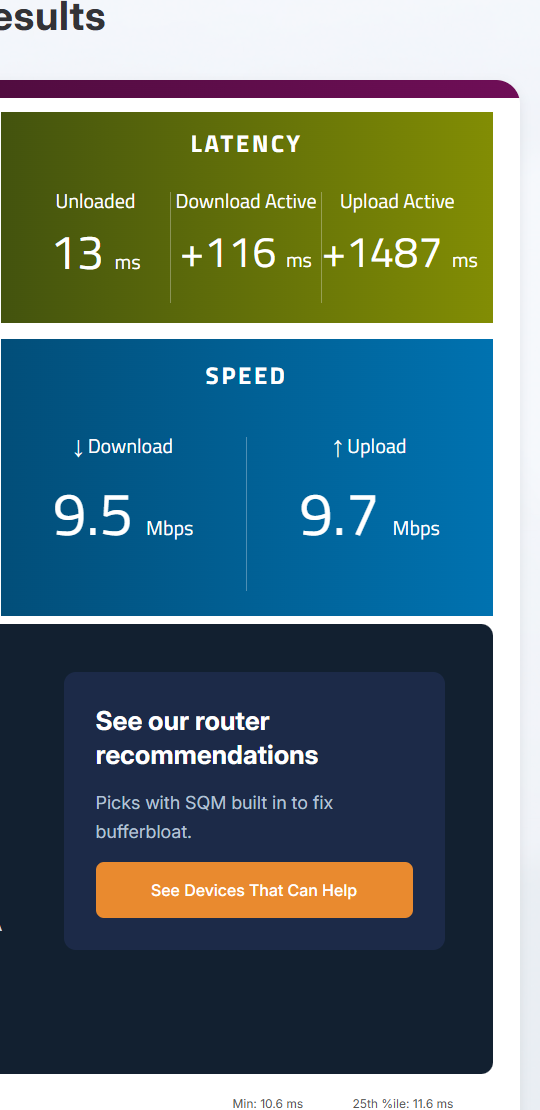
| B1 | 09:46 | SQM on, cake 900/900 Invalid. The PC's Ethernet link had renegotiated to 10 Mbps (reseated, back at 1 Gbps for the redo). | Off | F | 13 | +116 | +1487 | 9.5 / 9.7 | Screenshot |
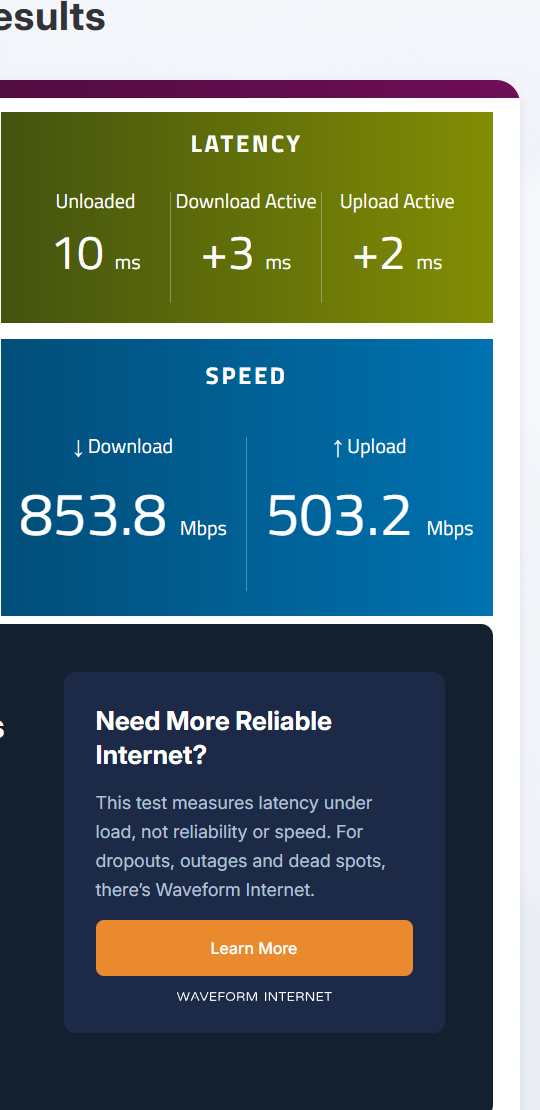
| B1 redo | 09:55 | SQM on, cake 900/900 | Off | A | 10 | +3 | +2 | 853.8 / 503.2 | Screenshot |
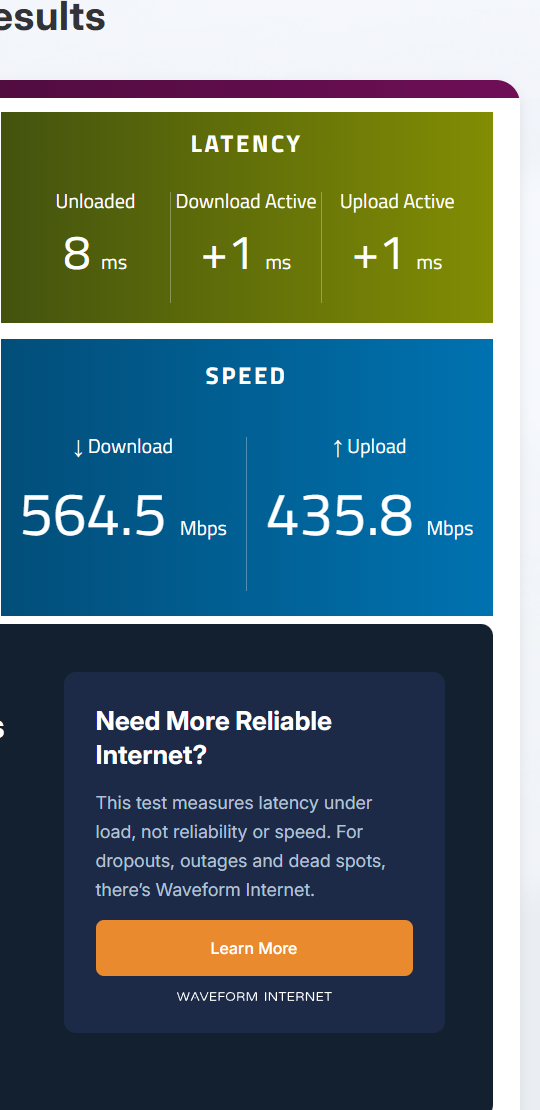
| B2 | 10:00 | SQM on, cake 600/600 | Off | A+ | 8 | +1 | +1 | 564.5 / 435.8 | Screenshot |
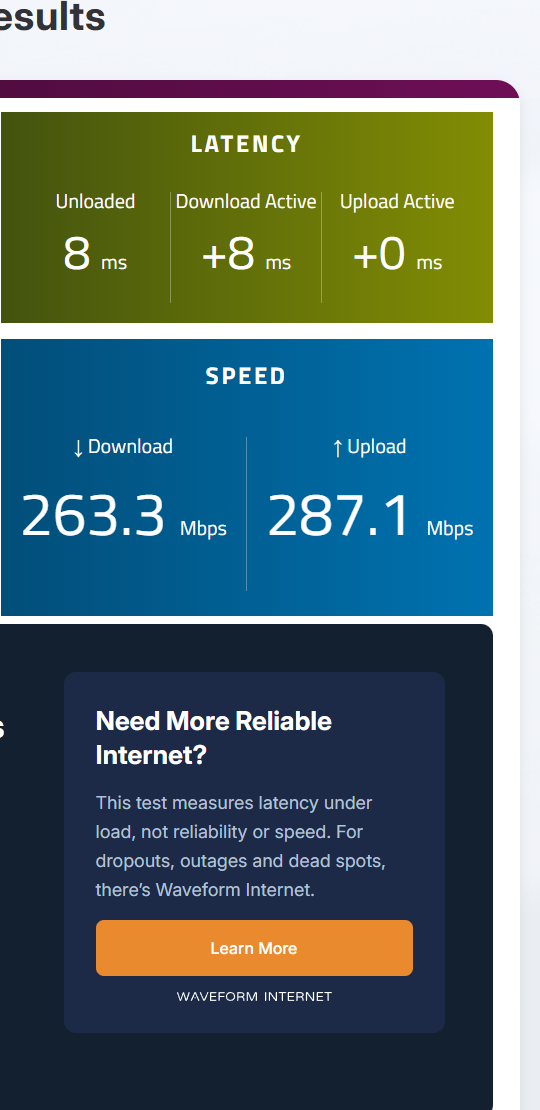
| B3 | 10:06 | SQM on, cake 300/300 | Off | A | 8 | +8 | +0 | 263.3 / 287.1 | Screenshot |
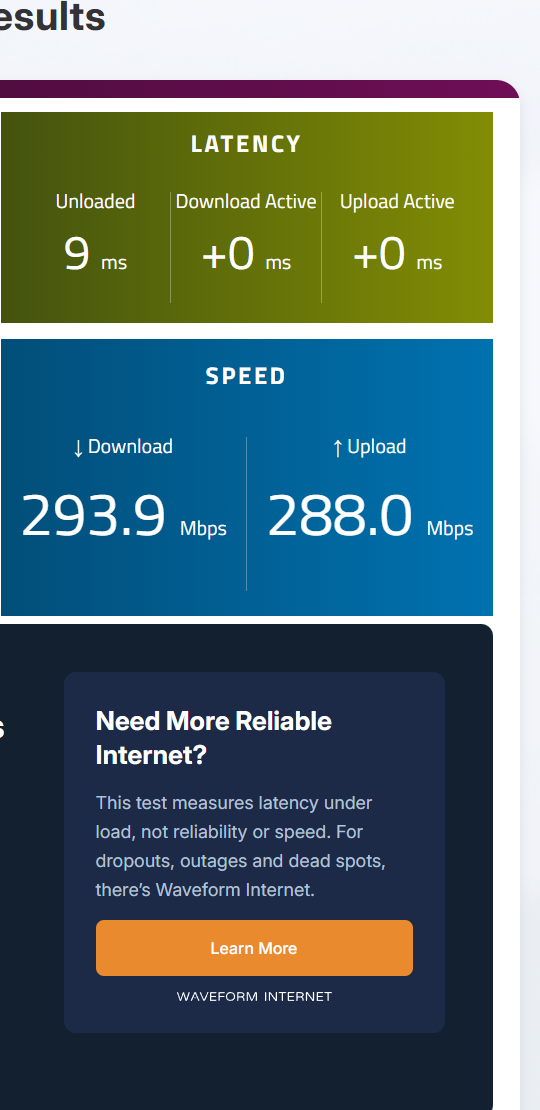
| B4 | 10:16 | SQM on, cake 300/300 | Off | A+ | 9 | +0 | +0 | 293.9 / 288 | Screenshot |
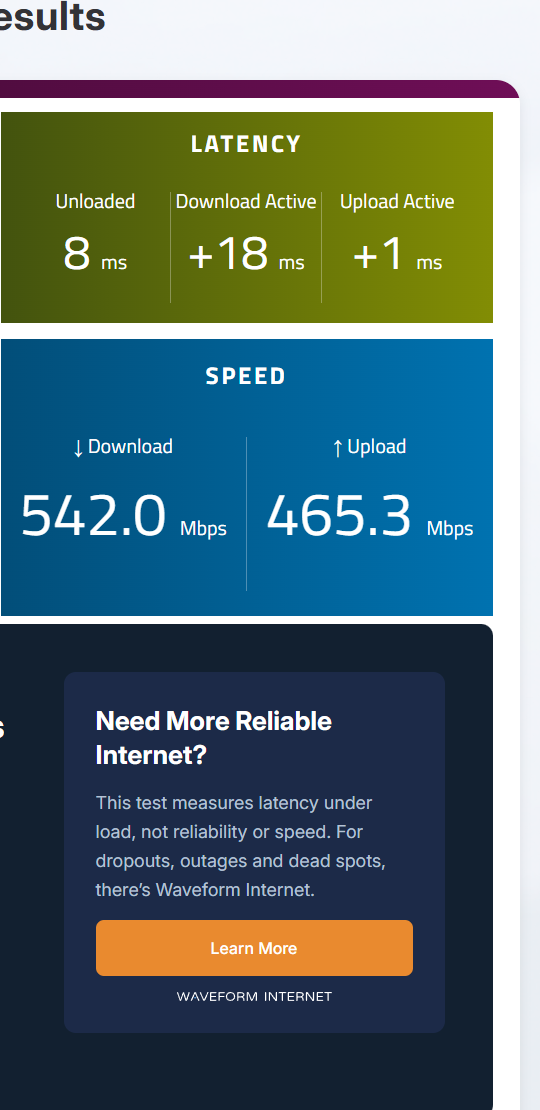
| B5 | 10:21 | SQM on, cake 600/600 | Off | A | 8 | +18 | +1 | 542 / 465.3 | Screenshot |
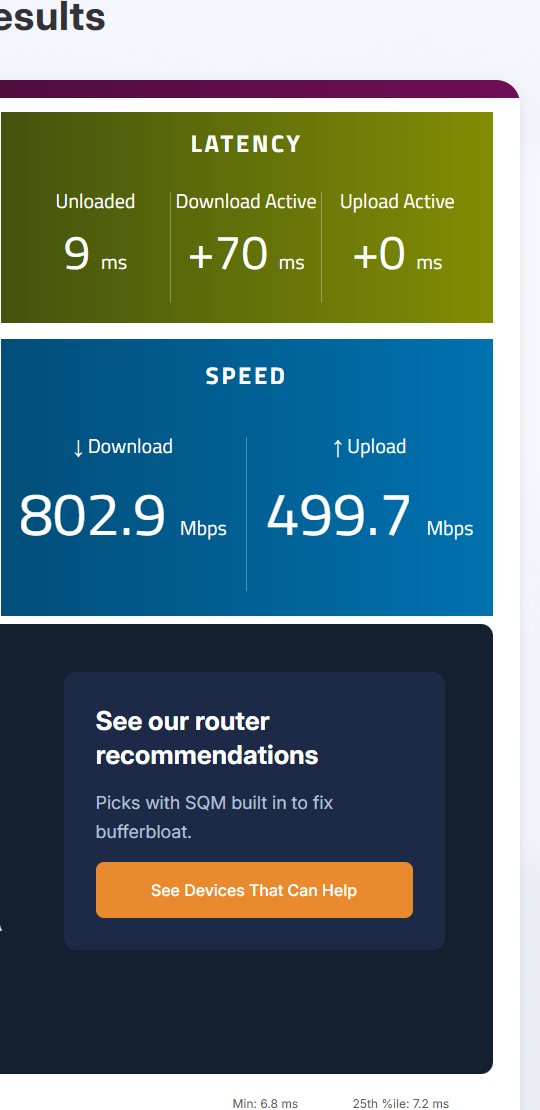
| B6 | 10:25 | SQM on, cake 900/900 Graded C on the download side (Waveform +70 down; my probe's 1 in 20 while downloading: +108 ms). The upload stayed clean. | Off | C | 9 | +70 | +0 | 802.9 / 499.7 | Screenshot |
Oct 21: cake vs fq_codel at 900 (Leg C)
The two queue rules GL offers, at the same 900/900 limit. B6 stands in for the first cake run. The saved captures cut off Waveform's grade tile, so each grade here is the one logged on test day; the latency and speed tiles show.
| Run | Time | What changed | IPv6 | Grade | Idle | +Down | +Up | Mbps ↓/↑ | Result |
|---|---|---|---|---|---|---|---|---|---|
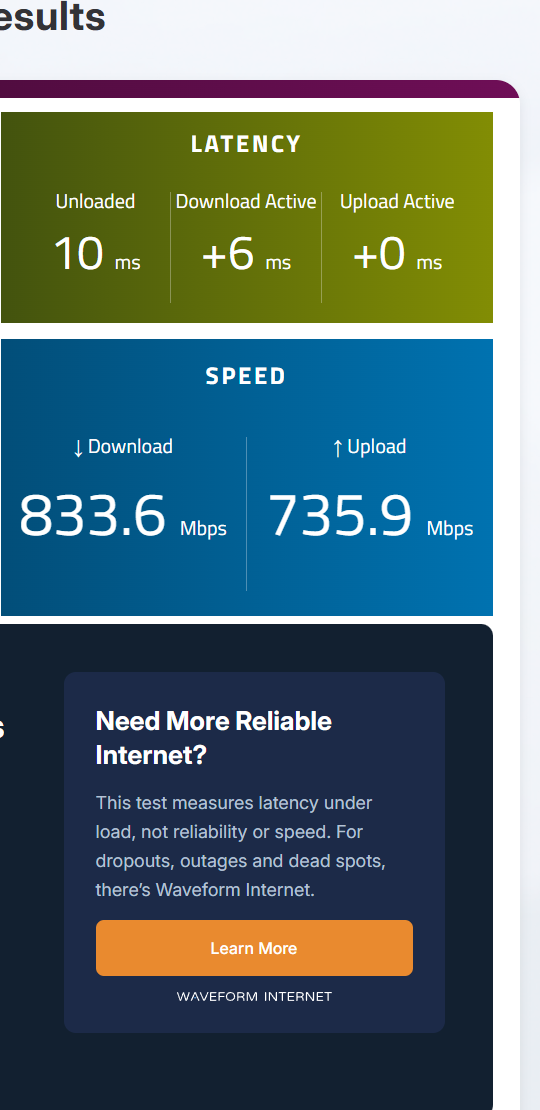
| C2 | 10:38 | SQM on, fq_codel 900/900 | Off | A | 10 | +6 | +0 | 833.6 / 735.9 | Screenshot |
| C3 | 10:44 | SQM on, cake 900/900 | Off | A+ | 8 | +2 | +1 | 857.9 / 430.8 | Screenshot |
| C4 | 10:49 | SQM on, fq_codel 900/900 | Off | A+ | 8 | +1 | +1 | 863.5 / 708.7 | Screenshot |
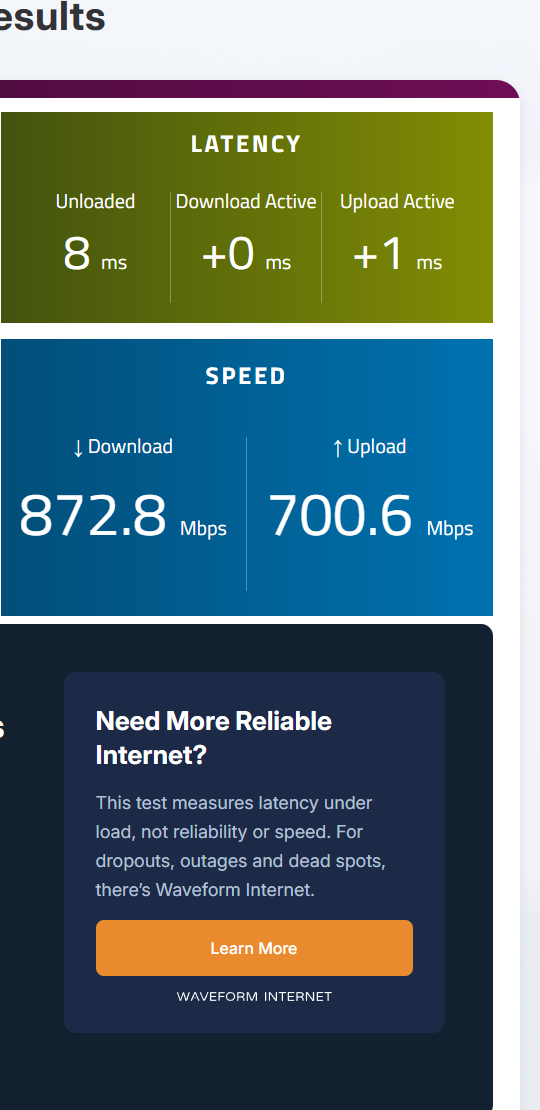
| C5 | 11:19 | SQM on, fq_codel 900/900 | Off | A+ | 8 | +0 | +1 | 872.8 / 700.6 | Screenshot |
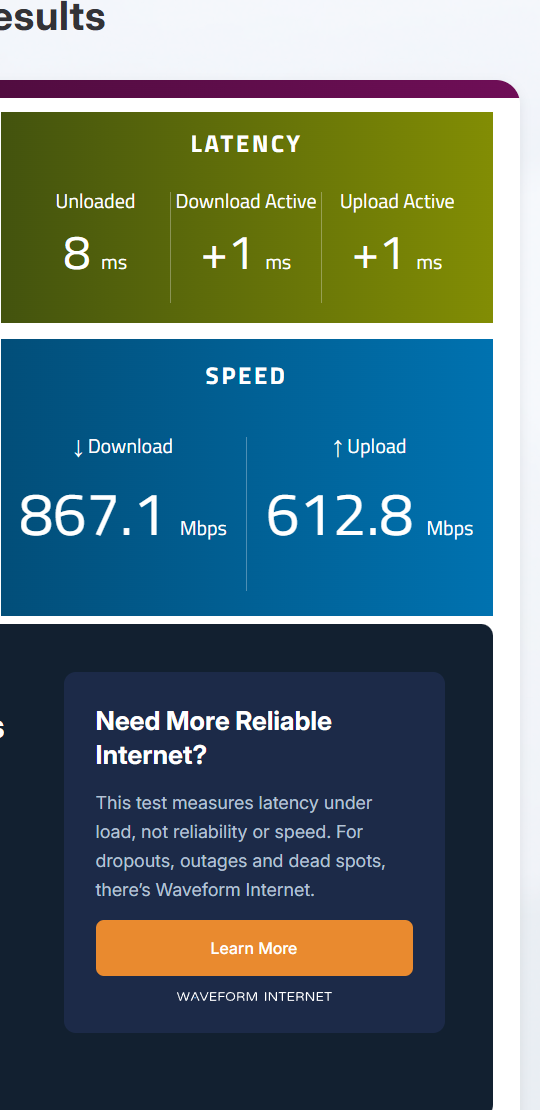
| C6 | 11:22 | SQM on, fq_codel 900/900 | Off | A+ | 8 | +1 | +1 | 867.1 / 612.8 | Screenshot |
Oct 21: IPv6 on, router NAT6 (Leg D)
IPv6 on at the PC and the Flint (GL's default NAT6), SQM off vs fq_codel 900/900.
| Run | Time | What changed | IPv6 | Grade | Idle | +Down | +Up | Mbps ↓/↑ | Result |
|---|---|---|---|---|---|---|---|---|---|
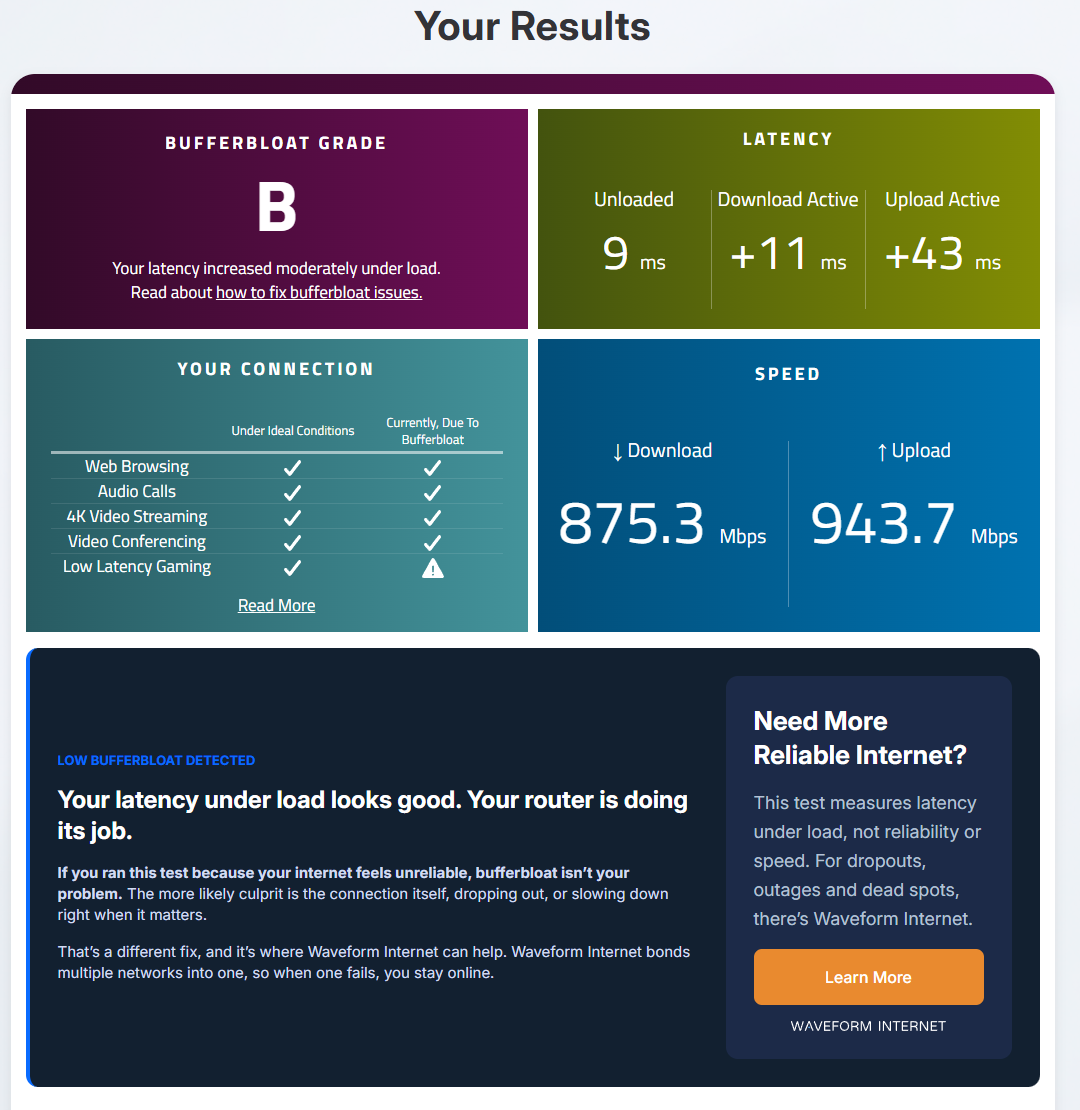
| D1 | 11:36 | Stock Flint, SQM off Not counted as IPv6 proof: Chrome's connection logger started after this run. | On, router NAT6 | B | 9 | +11 | +43 | 875.3 / 943.7 | Screenshot |
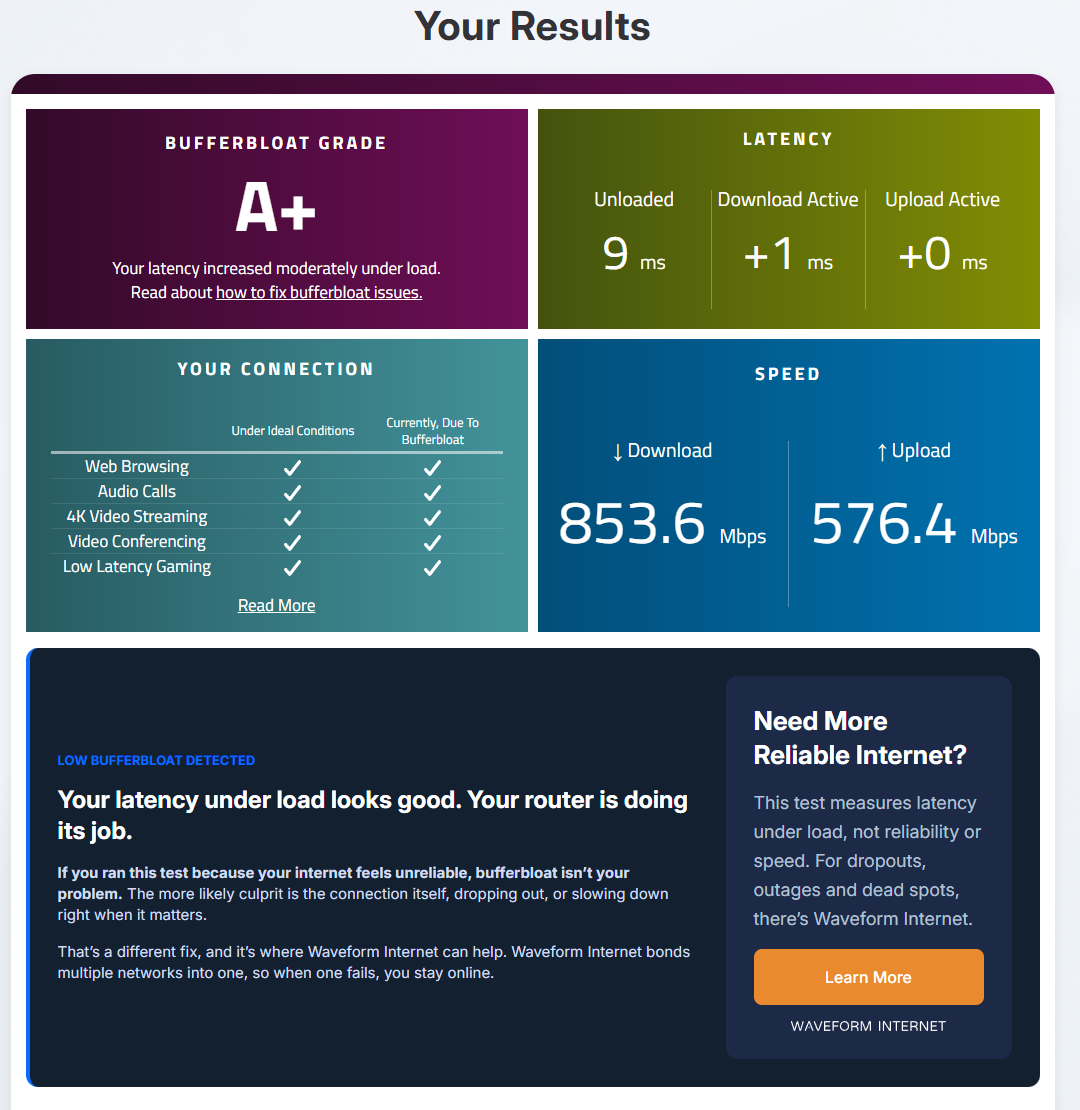
| D2 | 11:42 | SQM on, fq_codel 900/900 Not counted as IPv6 proof: Chrome's connection logger started after this run. | On, router NAT6 | A+ | 9 | +1 | +0 | 853.6 / 576.4 | Screenshot |
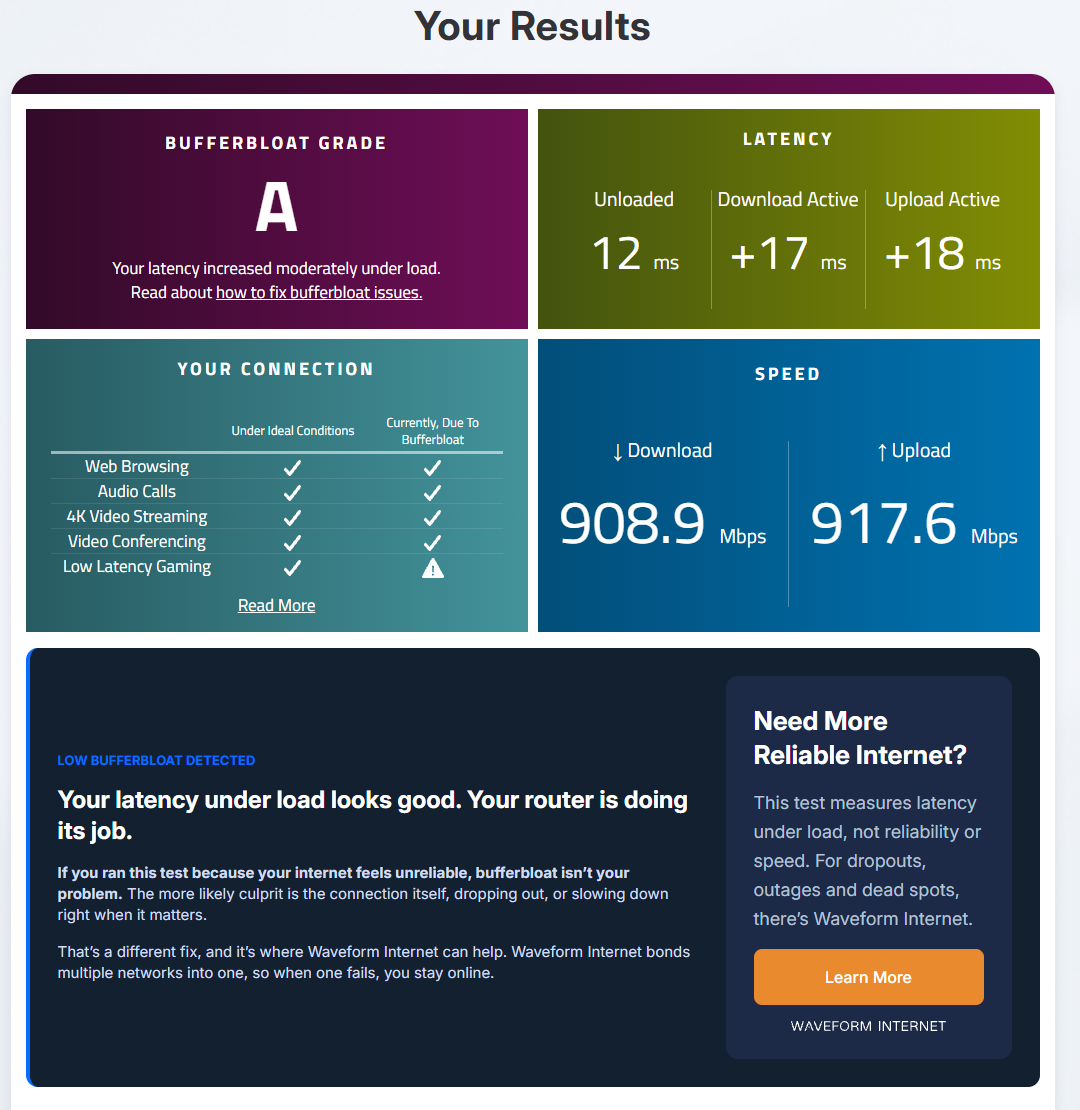
| D3 | 11:50 | Stock Flint, SQM off | On, router NAT6 | A | 12 | +17 | +18 | 908.9 / 917.6 | Screenshot |
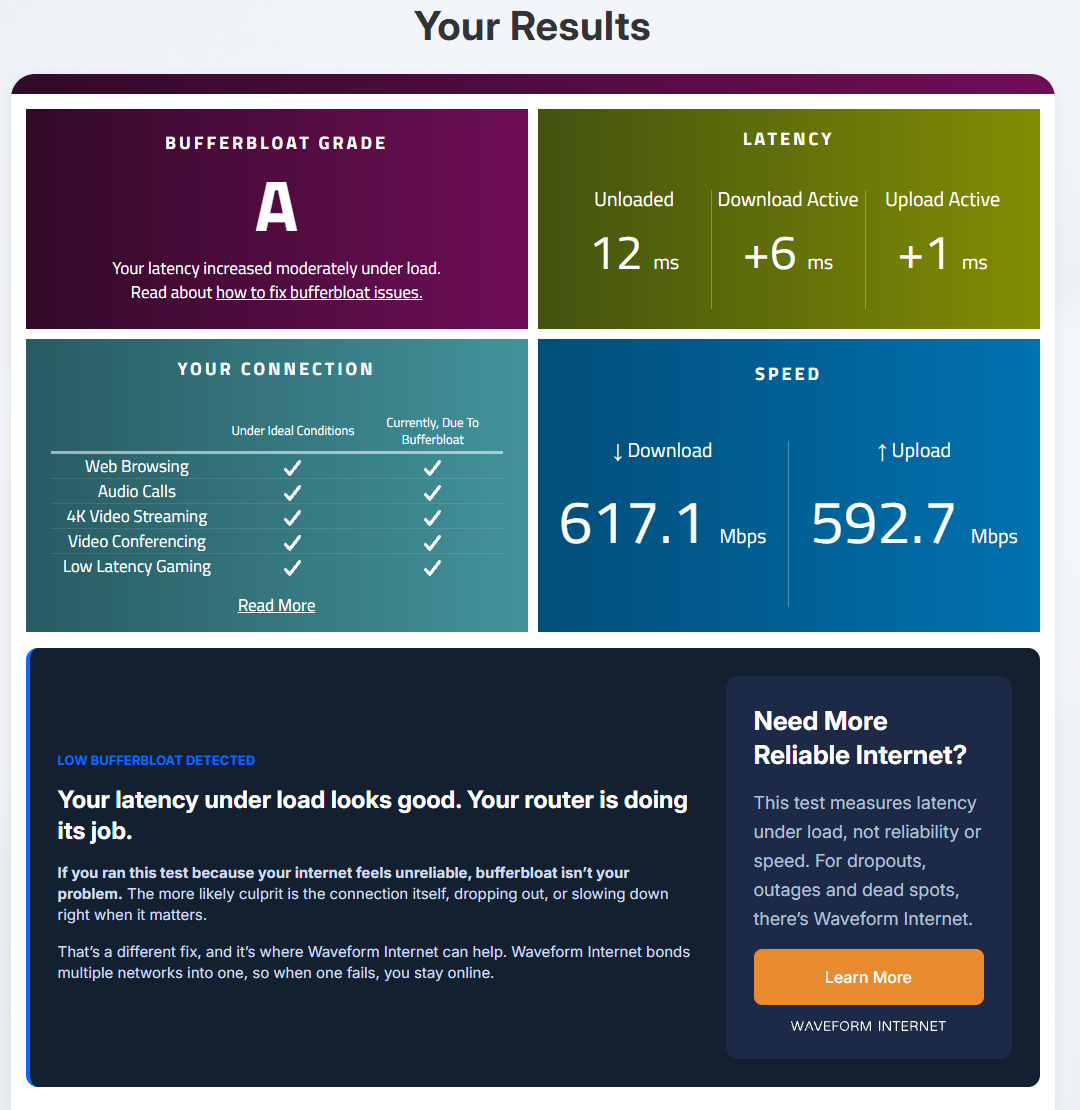
| D4 | 11:56 | SQM on, fq_codel 900/900 | On, router NAT6 | A | 12 | +6 | +1 | 617.1 / 592.7 | Screenshot |
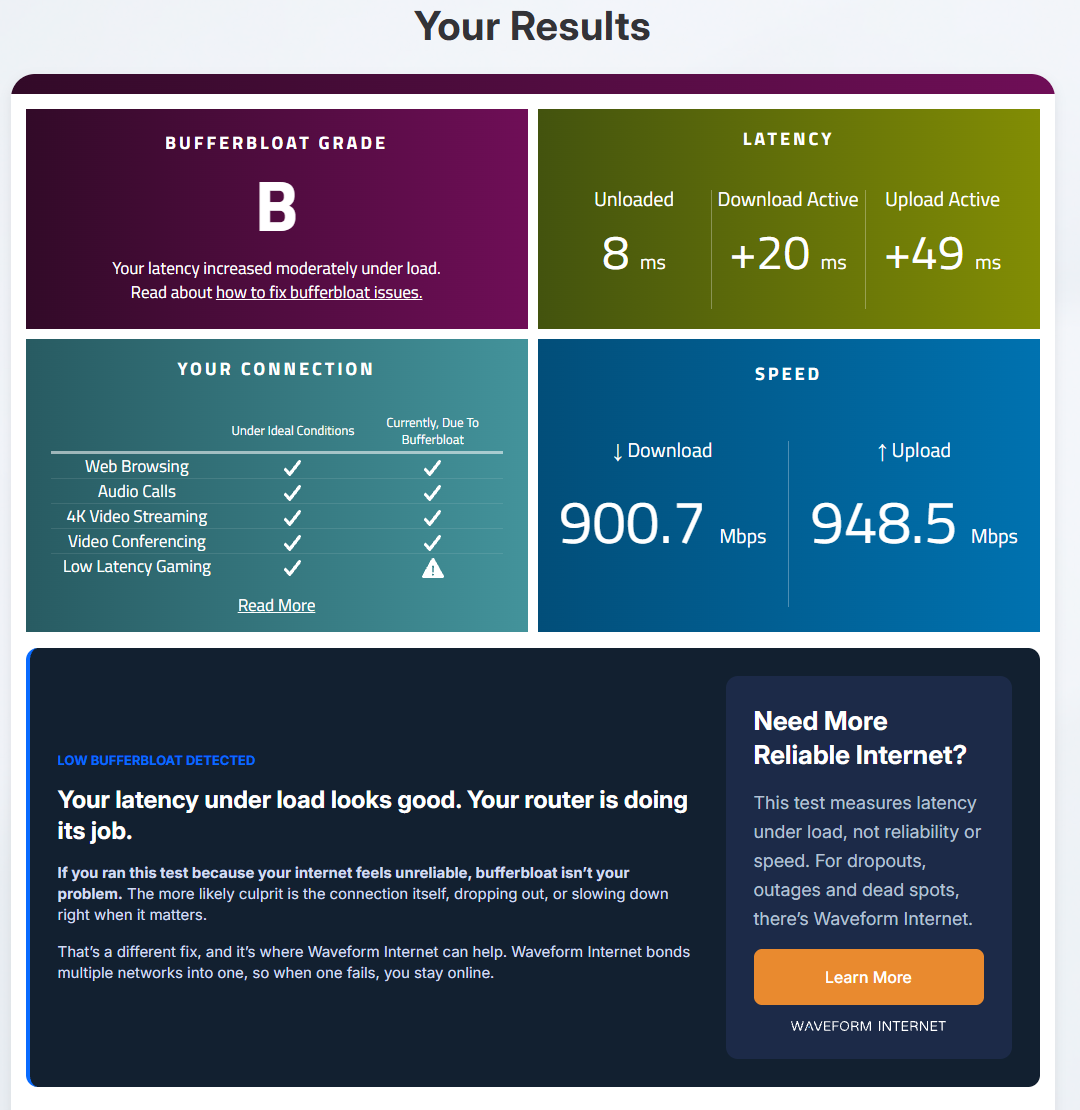
| D5 | 12:02 | Stock Flint, SQM off | On, router NAT6 | B | 8 | +20 | +49 | 900.7 / 948.5 | Screenshot |
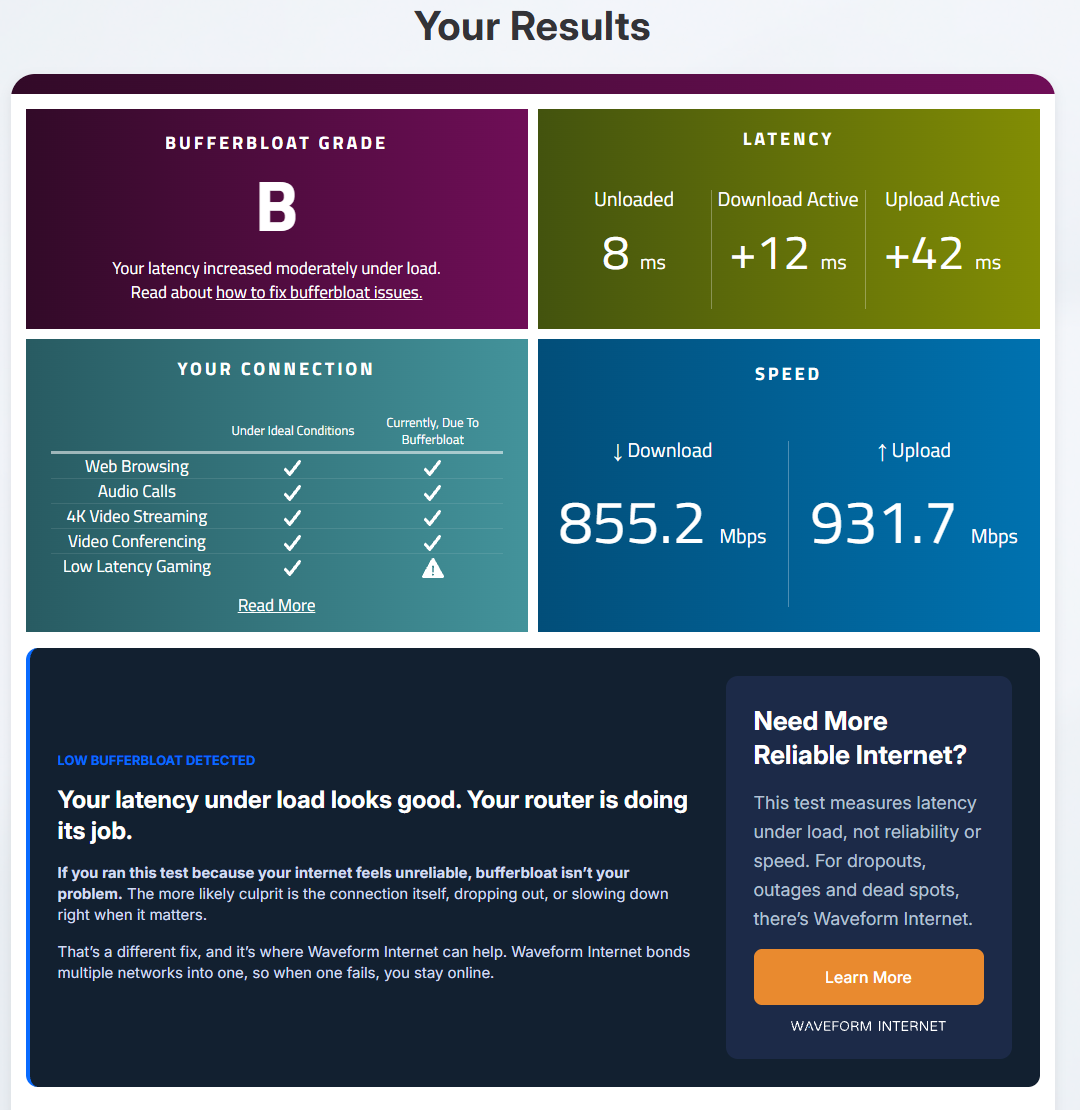
| D5 redo | 12:06 | Stock Flint, SQM off | On, router NAT6 | B | 8 | +12 | +42 | 855.2 / 931.7 | Screenshot |
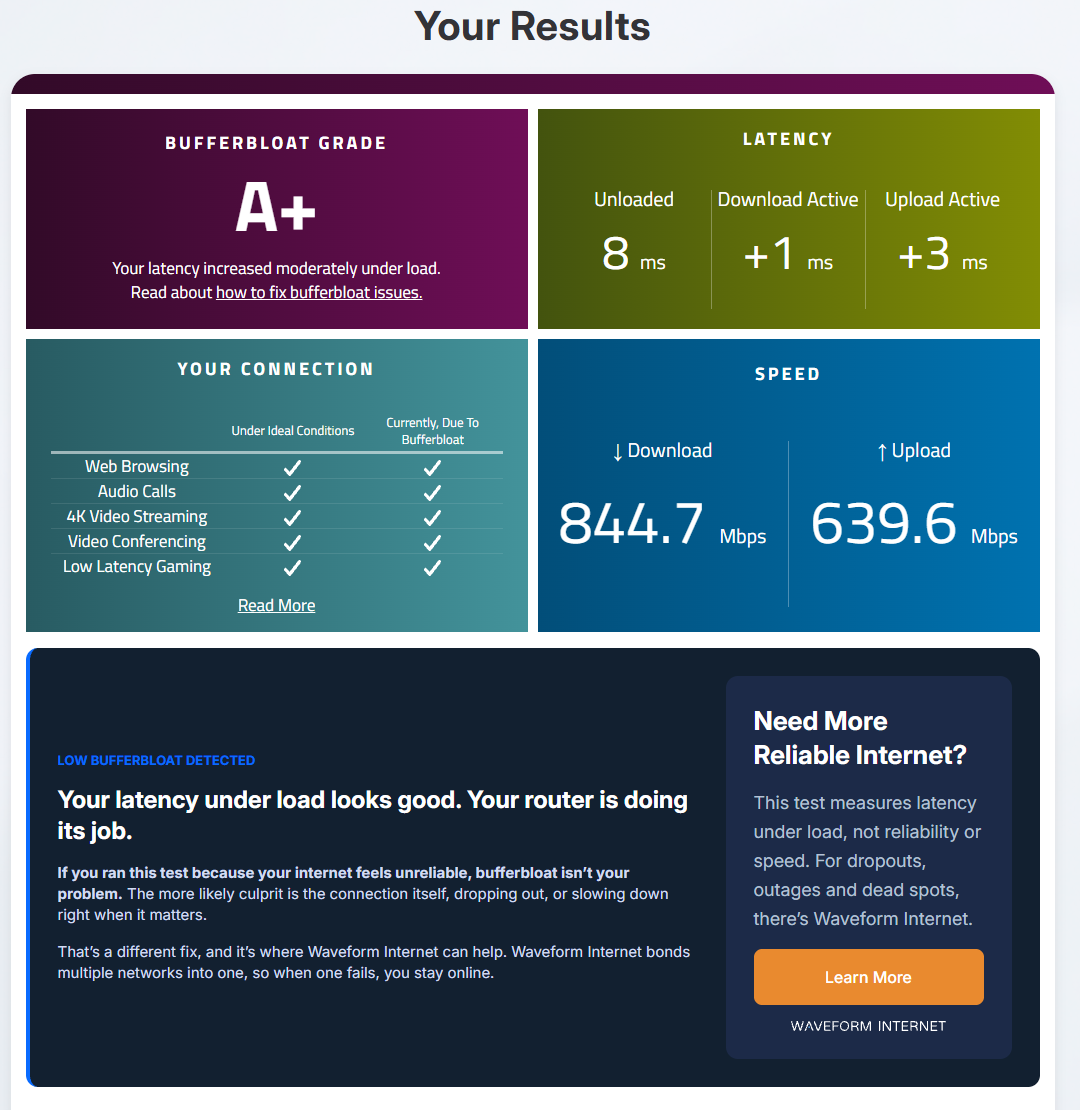
| D6 | 12:11 | SQM on, fq_codel 900/900 | On, router NAT6 | A+ | 8 | +1 | +3 | 844.7 / 639.6 | Screenshot |
Oct 21: IPv6 on, native (Leg D top-up)
The Flint's IPv6 switched to Native, so the PC gets ISP-assigned IPv6 the way it did on the Nest. SQM off vs fq_codel 900/900.
| Run | Time | What changed | IPv6 | Grade | Idle | +Down | +Up | Mbps ↓/↑ | Result |
|---|---|---|---|---|---|---|---|---|---|
| D7 | 12:32 | Stock Flint, SQM off | On, native (ISP-assigned) | C | +15 | +72 | 878.4 / 929.9 | Screenshot | |
| D8 | 12:37 | SQM on, fq_codel 900/900 | On, native (ISP-assigned) | A+ | +0 | +1 | 846.6 / 778.7 | Screenshot | |
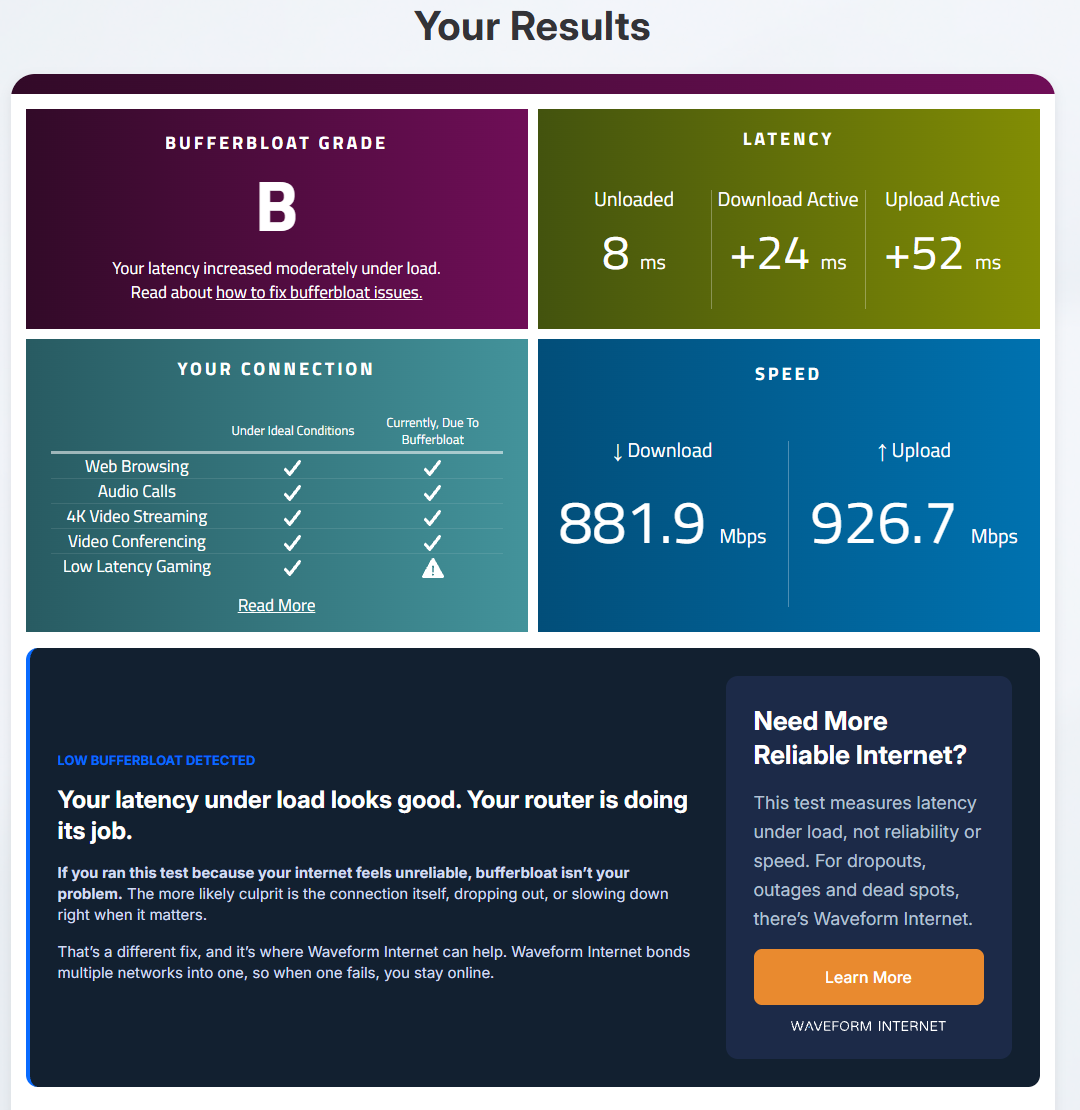
| D9 | 12:41 | Stock Flint, SQM off Mostly IPv6: one Cloudflare IPv4 connection showed up during the upload. | On, native (ISP-assigned) | B | +24 | +52 | 881.9 / 926.7 | Screenshot | |
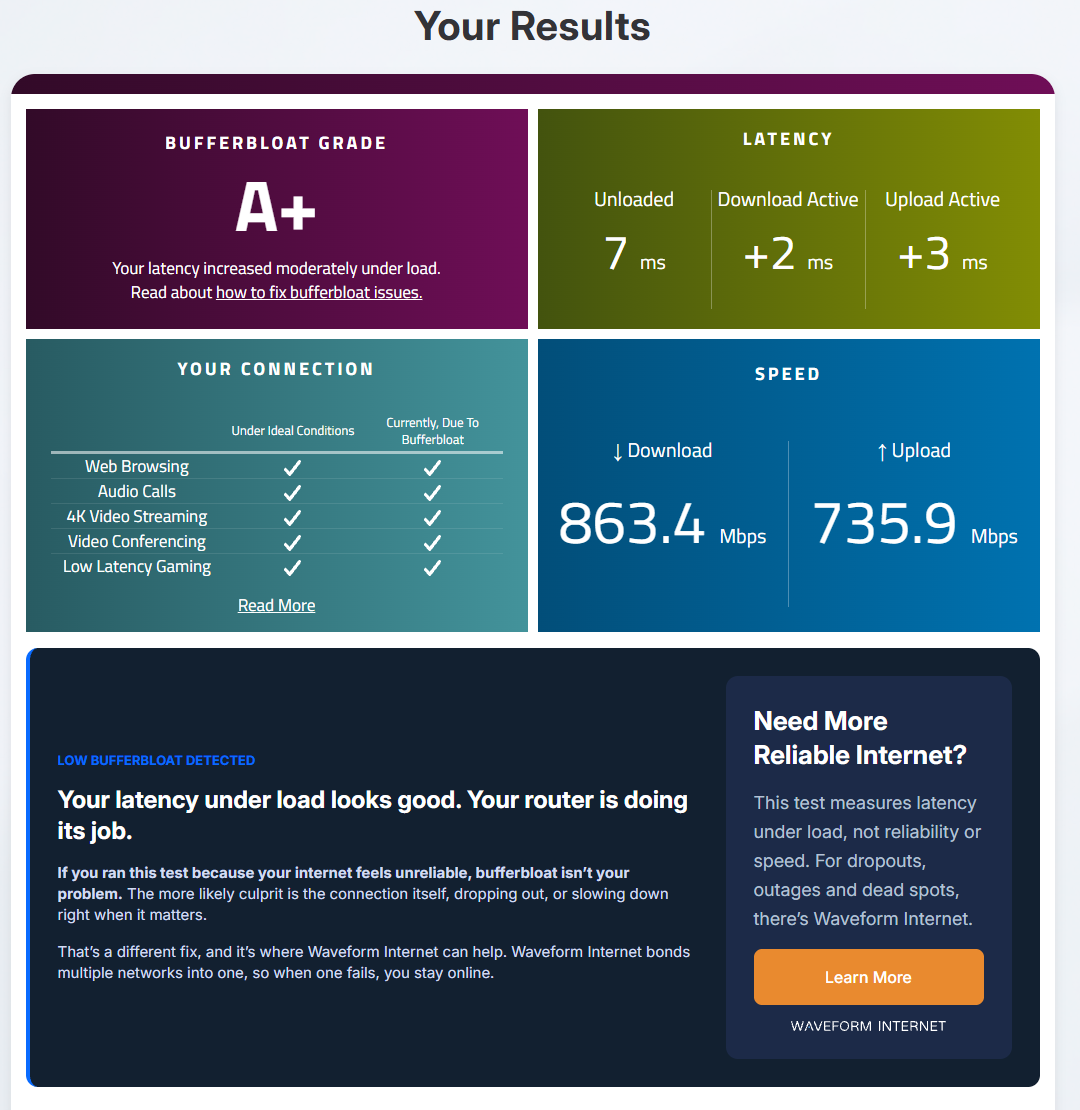
| D10 | 12:45 | SQM on, fq_codel 900/900 | On, native (ISP-assigned) | A+ | +2 | +3 | 863.4 / 735.9 | Screenshot |
Oct 20-21: the phone loads the line (Leg F)
The PC sits idle with the probe running while the phone on the Flint's 6 GHz Wi-Fi runs Waveform. SQM off vs cake 900/900. The phone's results are Brent's read-outs (its incognito tab blocks screenshots).
| Run | Time | What changed | IPv6 | Grade | Idle | +Down | +Up | Mbps ↓/↑ | Result |
|---|---|---|---|---|---|---|---|---|---|
| F1 redo | 15:18 | Stock Flint, SQM off | Off | A | 13 | +19 | +7 | 1105.4 / 178.2 | Read-out |
| F2 redo | 15:24 | SQM on, cake 900/900 Invalid. PC not idle in the 30 s baseline (3 samples over 5 Mbps, peak 338.6): short upload bursts from another app on the PC. | Off | A | 15 | +27 | +10 | 828.2 / 348.9 | Read-out |
| F2 redo 2 | 15:38 | SQM on, cake 900/900 | Off | A | 13 | +8 | +4 | 833 / 393 | Read-out |
| F3 redo | 15:44 | Stock Flint, SQM off | Off | A | 15 | +8 | +2 | 1105.1 / 376.9 | Read-out |
| F4 | 15:53 | SQM on, cake 900/900 | Off | A | 15 | +10 | +4 | 750.7 / 337 | Read-out |
| F5 | 09:00 | Stock Flint, SQM off | Off | A | 14 | +12 | +5 | 1122.4 / 468.2 | Read-out |
| F6 | 09:06 | SQM on, cake 900/900 | Off | A | 12 | +6 | +3 | 846.4 / 447.3 | Read-out |
Oct 20: Leg F, phone on the Nest (off-plan)
The phone had auto-joined the Nest's Wi-Fi, so these three don't count toward Leg F. Kept in the record.
| Run | Time | What changed | IPv6 | Grade | Idle | +Down | +Up | Mbps ↓/↑ | Result |
|---|---|---|---|---|---|---|---|---|---|
| F1 Nest | 14:46 | Stock Flint, SQM off | Off | D | 20 | +51 | +214 | 388.7 / 301.2 | Read-out |
| F2 Nest | 14:57 | SQM on, cake 900/900 | Off | D | 18 | +58 | +203 | 401.8 / 301.9 | Read-out |
| F3 Nest | 15:05 | Stock Flint, SQM off Invalid. PC not idle (one sample at 467.3 Mbps, source unknown). | Off | C | 16 | +27 | +155 | 504 / 359.3 | Read-out |
Oct 21: a phone on the Nest's Wi-Fi (Leg E)
The phone on the Nest's Wi-Fi (behind the Flint), PC idle, SQM off vs fq_codel 900/900. Graded by Waveform's upload delay; no probe.
| Run | Time | What changed | IPv6 | Grade | Idle | +Down | +Up | Mbps ↓/↑ | Result |
|---|---|---|---|---|---|---|---|---|---|
| E1 | 13:06 | Stock Flint, SQM off | Off | C | 16 | +31 | +161 | 449 / 360.1 | Screenshot |
| E2 | 13:10 | SQM on, fq_codel 900/900 | Off | D | 13 | +26 | +210 | 487.6 / 306.2 | Screenshot |
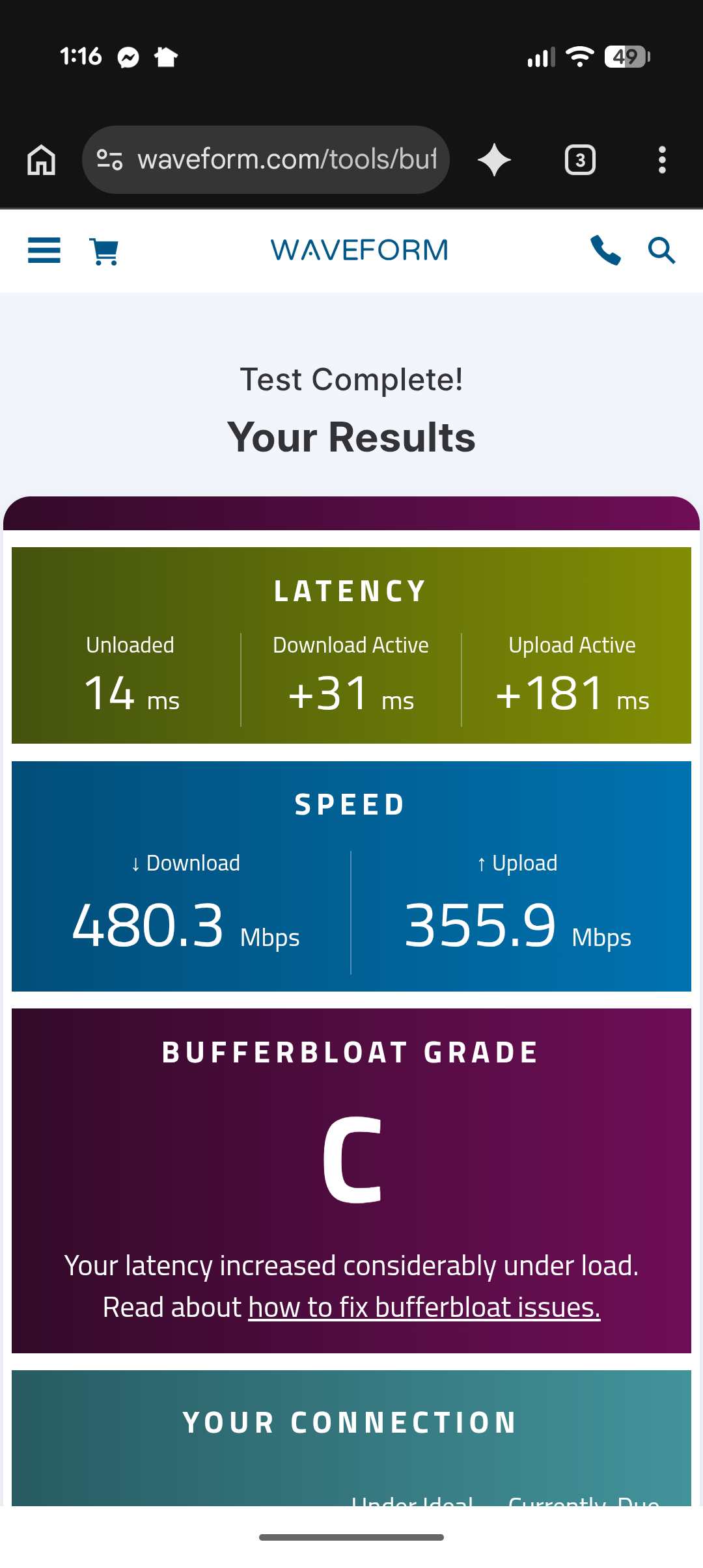
| E3 | 13:15 | Stock Flint, SQM off | Off | C | 14 | +31 | +181 | 480.3 / 355.9 | Screenshot |
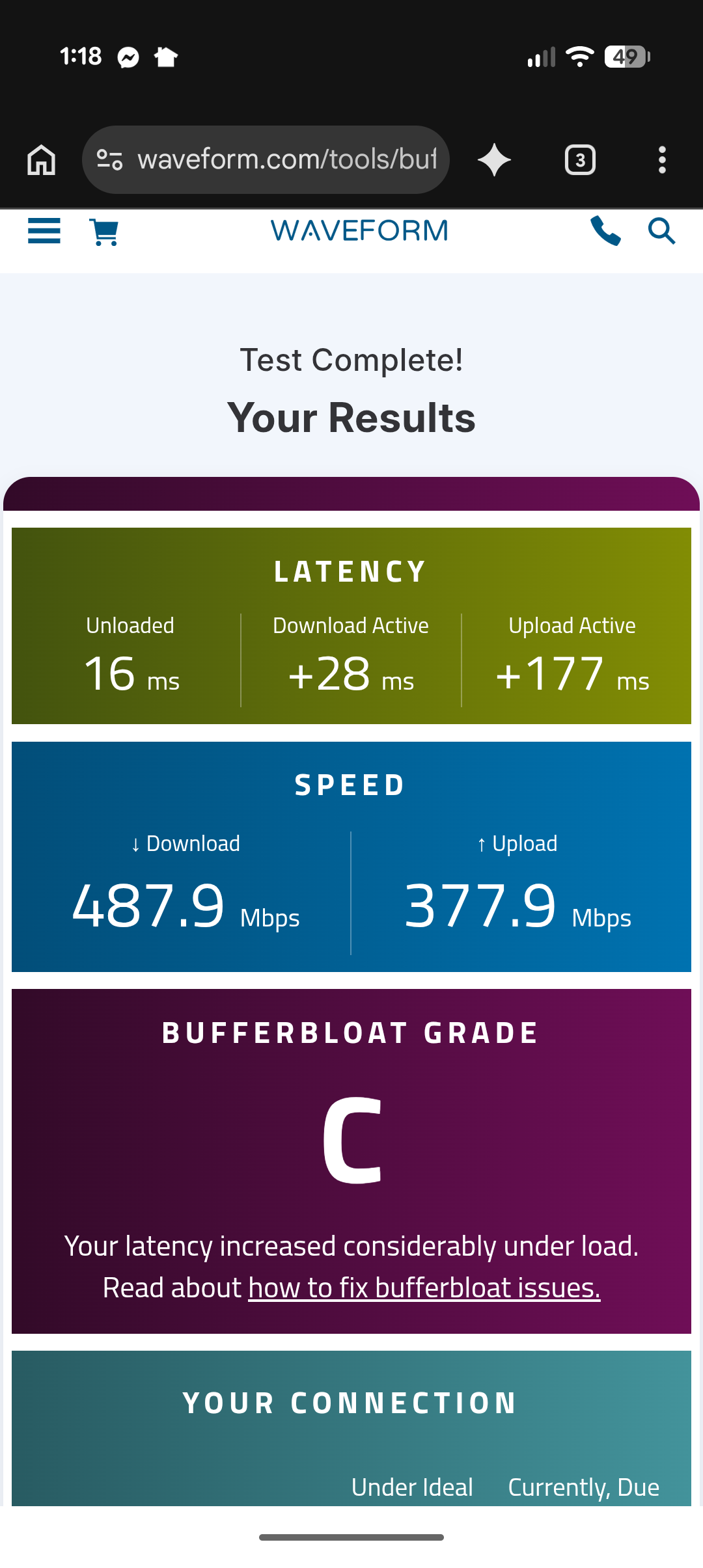
| E4 | 13:18 | SQM on, fq_codel 900/900 | Off | C | 16 | +28 | +177 | 487.9 / 377.9 | Screenshot |
Probe run windows
Each run's time window in its probe file, so anyone can rerun analyze_v2.py and get the same numbers.
| Run | File | Start | End |
|---|---|---|---|
| Before-1 | 2026-10-15-nest-baseline-probe-runs-1-3.csv | 13:29:09 | 13:31:40 |
| Before-2 | 2026-10-15-nest-baseline-probe-runs-1-3.csv | 13:31:41 | 13:34:50 |
| Before-3 | 2026-10-15-nest-baseline-probe-runs-1-3.csv | 13:34:51 | 13:36:55 |
| N1 | 2026-10-20-leg-0-nest-control-probe.csv | 12:58:00 | 13:00:29 |
| N2 | 2026-10-20-leg-0-nest-control-probe.csv | 13:04:16 | 13:05:50 |
| Shaping check | 2026-10-20-leg-a-flint-probe.csv | 13:48:00 | 13:50:08 |
| A1 | 2026-10-20-leg-a-flint-probe.csv | 14:17:00 | 14:18:28 |
| A2 | 2026-10-20-leg-a-flint-probe.csv | 14:21:00 | 14:22:48 |
| A3 | 2026-10-20-leg-a-flint-probe.csv | 14:26:00 | 14:27:53 |
| A4 | 2026-10-20-leg-a-flint-probe.csv | 14:30:00 | 14:31:48 |
| A5 | 2026-10-20-leg-a-flint-probe.csv | 14:36:00 | 14:37:23 |
| A6 | 2026-10-20-leg-a-flint-probe.csv | 14:41:00 | 14:42:35 |
| B1 redo | 2026-10-21-leg-b-flint-probe.csv | 09:55:00 | 09:57:13 |
| B2 | 2026-10-21-leg-b-flint-probe.csv | 10:00:00 | 10:02:48 |
| B3 | 2026-10-21-leg-b-flint-probe.csv | 10:06:00 | 10:14:15 |
| B4 | 2026-10-21-leg-b-flint-probe.csv | 10:14:30 | 10:19:06 |
| B5 | 2026-10-21-leg-b-flint-probe.csv | 10:21:00 | 10:23:09 |
| B6 | 2026-10-21-leg-b-flint-probe.csv | 10:25:00 | 10:27:55 |
| C2 | 2026-10-21-leg-c-flint-probe.csv | 10:38:00 | 10:41:10 |
| C3 | 2026-10-21-leg-c-flint-probe.csv | 10:44:00 | 10:47:52 |
| C4 | 2026-10-21-leg-c-flint-probe.csv | 10:49:00 | 11:17:03 |
| C5 | 2026-10-21-leg-c-flint-probe.csv | 11:19:00 | 11:21:07 |
| C6 | 2026-10-21-leg-c-flint-probe.csv | 11:22:00 | 11:24:06 |
| D1 | 2026-10-21-leg-d-flint-probe.csv | 11:36:00 | 11:38:26 |
| D2 | 2026-10-21-leg-d-flint-probe.csv | 11:42:00 | 11:43:49 |
| D3 | 2026-10-21-leg-d-flint-probe.csv | 11:50:00 | 11:52:04 |
| D4 | 2026-10-21-leg-d-flint-probe.csv | 11:56:00 | 11:58:37 |
| D5 | 2026-10-21-leg-d-flint-probe.csv | 12:02:00 | 12:04:13 |
| D5 redo | 2026-10-21-leg-d-flint-probe.csv | 12:06:00 | 12:07:45 |
| D6 | 2026-10-21-leg-d-flint-probe.csv | 12:11:00 | 12:13:17 |
| D7 | 2026-10-21-leg-d-native-flint-probe.csv | 12:32:00 | 12:34:30 |
| D8 | 2026-10-21-leg-d-native-flint-probe.csv | 12:37:00 | 12:39:13 |
| D9 | 2026-10-21-leg-d-native-flint-probe.csv | 12:41:00 | 12:42:45 |
| D10 | 2026-10-21-leg-d-native-flint-probe.csv | 12:45:00 | 12:47:30 |
Method
- Every graded test is Waveform's free bufferbloat test, run in Chrome on a wired PC with nothing else downloading (on my phone in Legs E and F). IPv6 off and auto-tuning normal (no Lag Fix) for every run except Leg D.
- The same probe as video #1 timed small UDP DNS queries and pings to Cloudflare about 4.5 times a second, split by the network card's traffic into idle, download and upload phases. Added delay = each sample minus that run's idle median.
- The run order, run counts and pass/fail rule were written down before the first router run: alternating off/on, no stopping early, no added runs.
- Before any counted run, a shaping check (SQM at 300 down / 150 up) proved the limit lands in the right direction.
- A router ping logger pinged the router itself about 5 times a second through every PC leg, to tell the router's own delay from the internet's.
- After each PC result, outside the run's window: one 100 MB download over a single connection (curl, from Hetzner in Ashburn, VA), timed.
- A run is invalid, stays in the record, and is redone in the same condition for: a warm-up hang, upload under 100 Mbps, a probe gap over 2 s during the upload, or (SQM on) speeds over the limit + 5%. One rule changed mid-test: the gap check covered the whole run until about 12:10 PM on Oct 21, when I narrowed it to the upload, because the stock Flint fills the PC's 1 Gbps link while downloading and the probe drops for about 2 seconds there. D5 and its redo each had a gap of just over 2 s while downloading, and both count under the narrowed rule. The IPv6 verdict already held on D1 to D4 without them.
- In Leg D, Chrome's open connections were logged once a second as IPv4 or IPv6, and only runs proven on IPv6 count as IPv6 results.
- Leg E was judged by Waveform's own upload delay on the phone, by Leg A's rule.
- Leg F judged the idle PC over the 45 seconds after each start mark, against the 30 seconds before it. The rule needed the stock runs to lag first (the load check); they didn't, so there's no verdict.
Setup
- Internet
- Google Fiber, 1 Gig plan
- Before
- Google Nest Wifi Pro at the Fiber Jack (the Oct 15 baseline, and Leg 0 on Oct 20). Its software wasn't re-read in October; it updates itself (3.78.518349 when last read, Sep 29).
- Router
- GL.iNet Flint 3 (GL-BE9300). It shipped on firmware 4.8.4, which had no SQM in its admin panel, and was upgraded to GL's 4.10.1 release on Oct 20 before any Flint run (read 1:27 PM). Its admin panel still read v4.10.1 on Oct 26, so every Flint run used 4.10.1.
- Windows
- Windows 11 Home 25H2, build 26200.9711, for every run. The update that brought it finished installing at the Oct 13 restart, and nothing else installed through Oct 21 (Windows' own update log). It read 26200.9711 on Oct 16, 20 and 25.
- Browser
- Chrome 155 on Oct 15 (155.0.8059.41 installed Oct 13 and 155.0.8059.80 read Oct 16, so the exact patch isn't known), and 155.0.8059.85 read the morning of Oct 20. Not re-read on Oct 21: by Oct 27 Chrome had updated itself to 156.0.8078.48, and no record dates that update, so the Oct 21 PC runs (Legs B, C and D) used Chrome 155 or 156.
- Connection
- PC wired to the router, 1 Gbps link (Realtek PCIe GbE, energy saving off), checked before every PC leg after run B1 fell to 10 Mbps (B1 is marked invalid and was redone). The Flint's WAN port linked to the Fiber Jack at 2.5 Gbps.
- Phone (Legs E and F)
- Brent's Pixel on 6 GHz Wi-Fi: the Nest's in Leg E, the Flint's in Leg F. Its grades are Waveform's own screenshots (Leg E) or Brent's read-outs (Leg F).
What I didn't test
- One router (the Flint 3 on firmware 4.10.1), one internet plan (Google Fiber 1 Gig), one PC. Other routers, plans and connection types can behave differently, and what SQM costs depends on the router's processor.
- Why cake hits a wall: I didn't measure the router's processor load, so "it's the CPU" is a guess.
- fq_codel at other limits: only 900 / 900, four runs.
- A device wired into the Nest behind the Flint: only my phone on the Nest's Wi-Fi was tested. A limit low enough to shape below the Nest's own speed wasn't tried either.
- Whether SQM protects a game while someone else maxes out the internet: my phone couldn't load the line enough to tell (Leg F).
- GL's other IPv6 modes (Passthrough and Static IPv6).
- A game server: the probe times Cloudflare's DNS, not a game.
Raw data
The files every number on this page is built from. Check my work. Each file opens as plain text; save it from your browser to keep a copy.